
Scope
This document describes three failure scenarios that separate having backups from being able to recover, and the guidance that follows from each. Every scenario is reproducible on a laptop from the lab repository above, and every terminal output shown is a real capture from that lab.
The document covers recovery of stateful applications running on Kubernetes: verifying that backups contain data, the split between declared state and stored state, and consistency across multi-volume applications. It does not cover compliance frameworks, product comparisons, or recovery of the underlying cloud or datacenter infrastructure, though it names where those responsibilities begin.
Specific tools appear where a scenario needs them (Velero, the CSI snapshot APIs). They are reference implementations used to make the scenarios concrete. The failure modes and the guidance apply to any tool occupying the same role.
Definitions
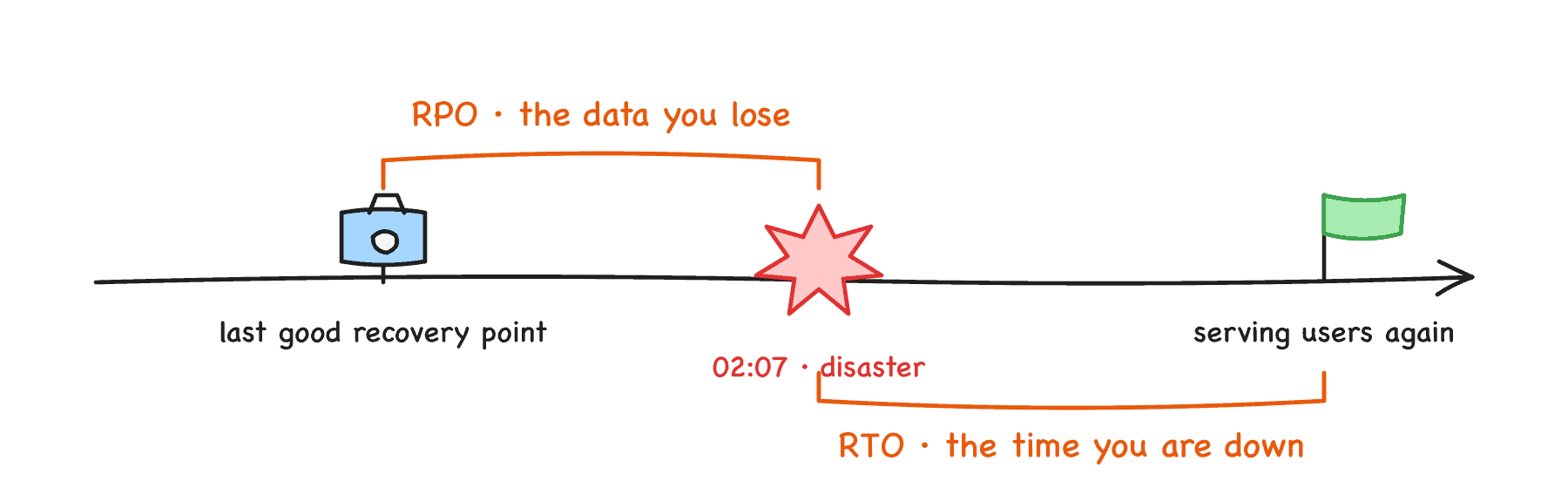
RPO and RTO on one timeline
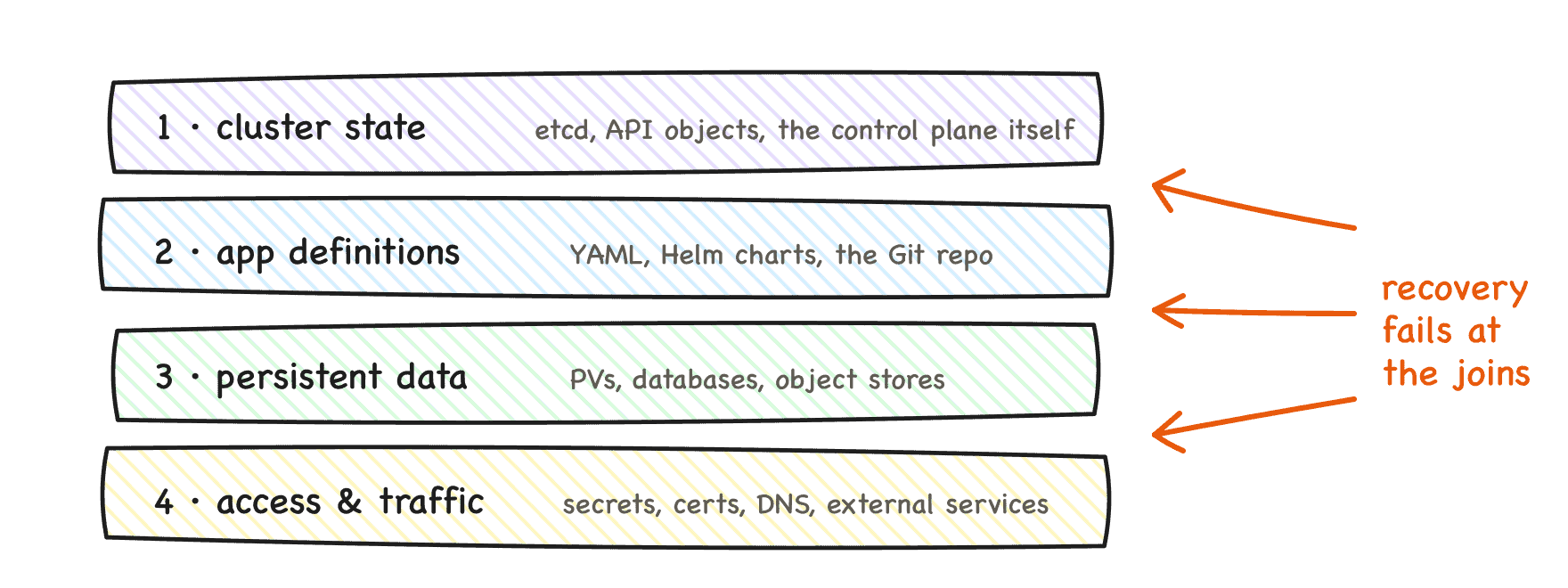
The four recovery layers
For a recovery to count, four layers must come back:
The four recovery layers
Each layer has mature tooling, and each usually recovers fine in isolation. Recovery fails at the joins between the layers: a restored cluster with no data, restored data with no traffic path, an application definition that provisions an empty volume. The three scenarios below each break one join.
The lab
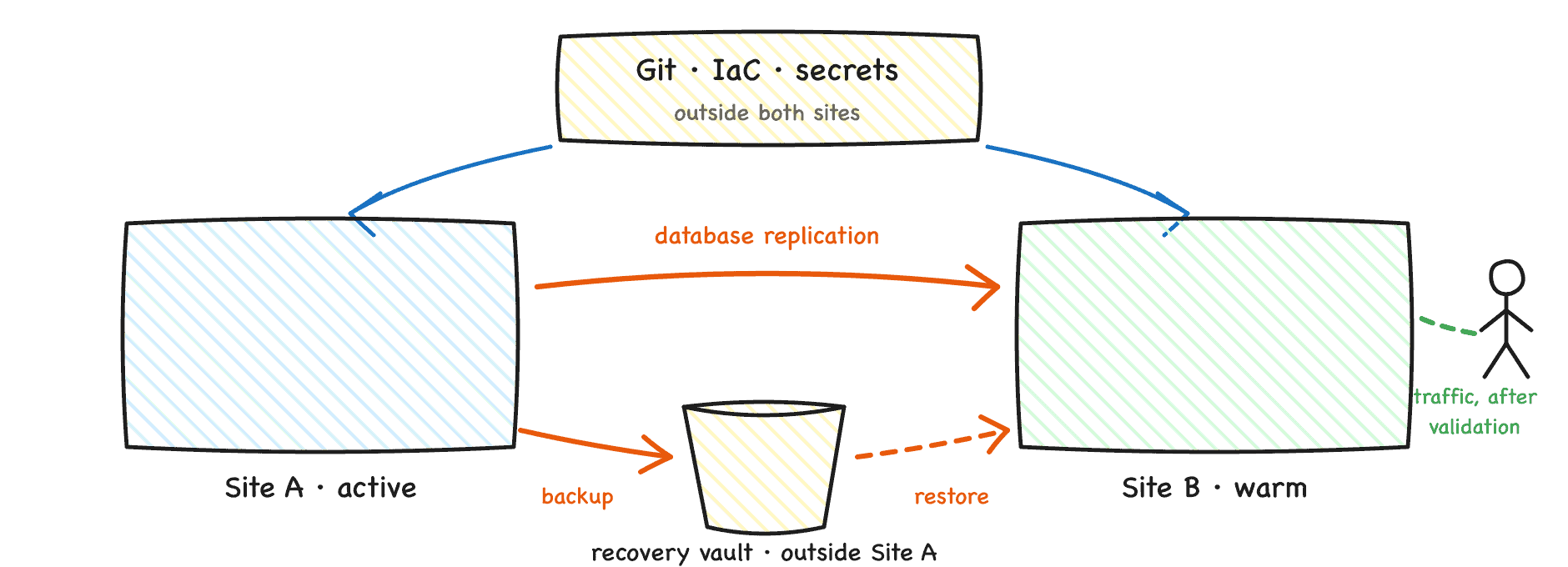
The whole lab in one picture
Two clusters and two services, all local:
- Production: a Kubernetes cluster where each node is its own lightweight VM with its own kernel, so losing production means powering off a machine.
- Recovery: a second cluster that exists before anything goes wrong.
- Backup store: an S3-compatible object store outside both clusters, so losing either cluster cannot take the recovery points with it. Both clusters point their backup tool at the same bucket.
- Git: a local Git service holding the application manifests, watched by a GitOps controller in the recovery cluster.
The workload is a PostgreSQL application with known contents (four rows), so every restore can be validated against an expected result rather than against a green dashboard.
Scenario 1: verifying that a backup contains data
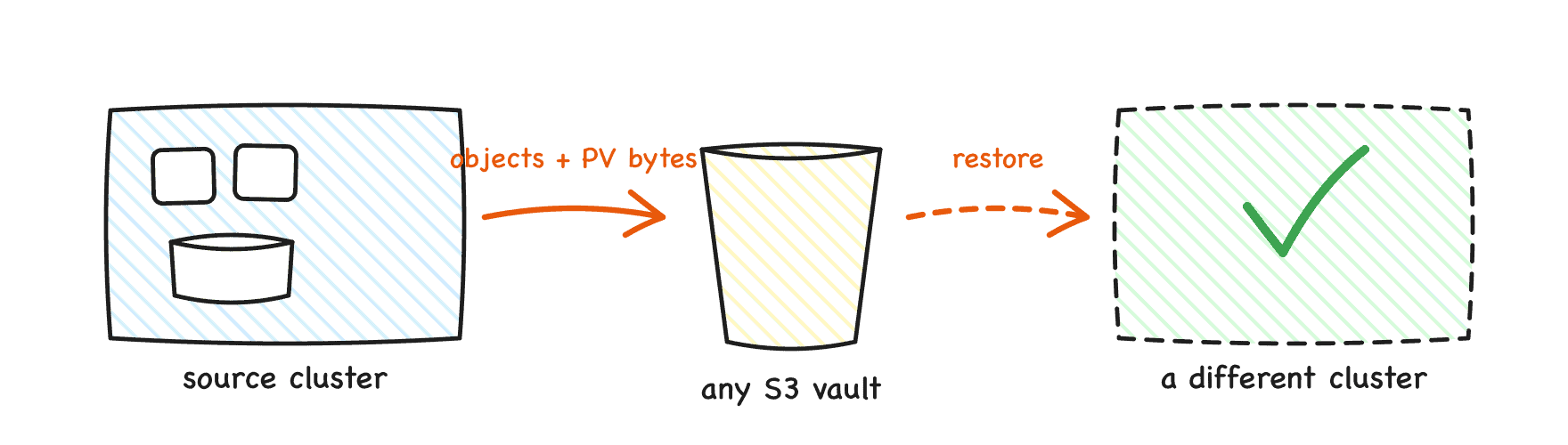
Backup tool moves objects and volume bytes to an S3 store
A Kubernetes backup has two distinct parts: the resource definitions (YAML) and the persistent volume data. Backup tools protect volume data through provider or CSI snapshots, file system backup, or snapshot data movement to an external store. The lab uses the last of these, with Velero and its data mover.
Most verification stops at the backup’s Completed status. Go one step further and confirm that volume bytes actually moved:
$ kubectl -n velero get datauploads -l velero.io/backup-name=$BACKUP \
    -o custom-columns='NAME:.metadata.name,PHASE:.status.phase,BYTES:.status.progress.bytesDone'
NAME                                       PHASE       BYTES
guestbook-rehearsal-20260727001126-q2j9m   Completed   47989888
This is the data mover confirming that 47,989,888 bytes of volume data left the cluster and landed in the external store. A backup tool that cannot report this number for a given backup deserves scrutiny.
Deleting the namespace, PVC included, and restoring from this backup returned the same four rows in about two minutes. That is the happy path, and it hides three things no backup tool does automatically:
- Protecting volume data does not make a database backup application consistent. Flush or quiesce hooks must be configured when the application requires them.
- Restoring onto different infrastructure may require storage class mappings and other transformations. Tools provide the mechanisms; each team must design and test them.
- A backup phase of Completed means the backup operation completed. It does not prove the application will start, contain the expected data, or serve traffic. Only an end to end recovery test provides that evidence.
Boundary. Backup tools restore resources into a cluster that already exists. They do not create the cluster, the nodes, the network, the load balancers, or DNS. Something else must recover Kubernetes itself, and that something is infrastructure as code or Cluster API. A DR plan that starts with “restore the backup” must state what the backup gets restored into.
Scenario 2: declared state is not stored state
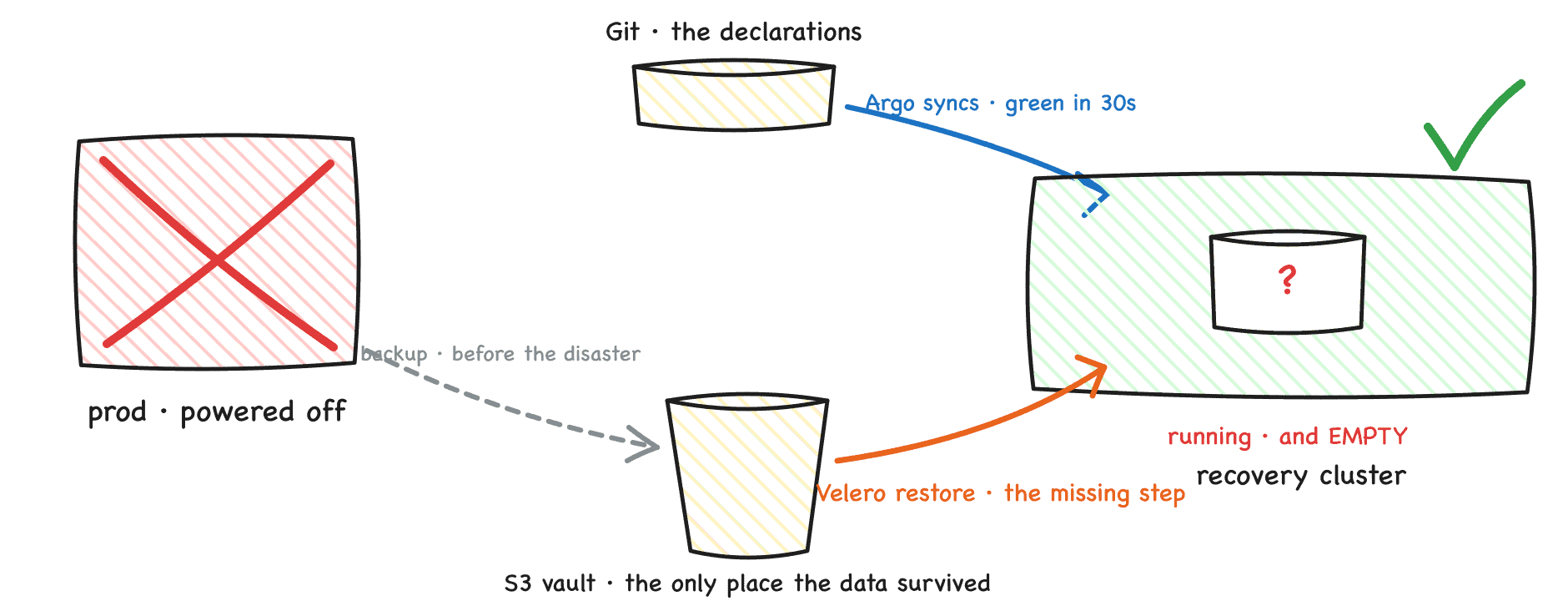
The GitOps trap: the controller rebuilds the declarations, the store holds the data
The production cluster is powered off. The recovery cluster, which existed before the disaster, has a GitOps controller pointed at Git and a backup tool pointed at the shared store. It has never run the application.
Syncing the application from Git succeeds: the sync reports Synced, the StatefulSet rolls out, the database pod is Running and Ready, every dashboard is green. Querying the database then returns:
ERROR: relation "attendees" does not exist
The database is running and it is empty. Nothing malfunctioned. Git only ever contained the declarations, so Kubernetes did exactly what the YAML says: create a StatefulSet, create a Service, and provision a brand new, empty volume for the PVC. GitOps reconstructed the declared state perfectly and restored none of the stored state.
Both tools are required because there are two different things to bring back and each tool carries exactly one of them: Git stores intent, and backups store state. In the lab, the recovery that produced validated data was:
- Remove the empty application the sync created.
- Restore the application, volumes included, from the backup store.
- Validate the data against the expected contents.
The restore also crossed infrastructure: the backup was taken on one node runtime and restored onto another. A disaster may force recovery onto different infrastructure, so restore portability is something to test, not assume.
Measurement. In the lab, powering off production to validated data in the recovery cluster took four minutes live and just under two minutes in a rehearsed rerun. Both figures measure only the scripted slice; a production RTO wraps detection, decision, traffic cutover, and failback around it. The general lesson: the moment the dashboards turned green was not the recovery. The moment the data came back and was checked was.
Scenario 3: multi-volume consistency
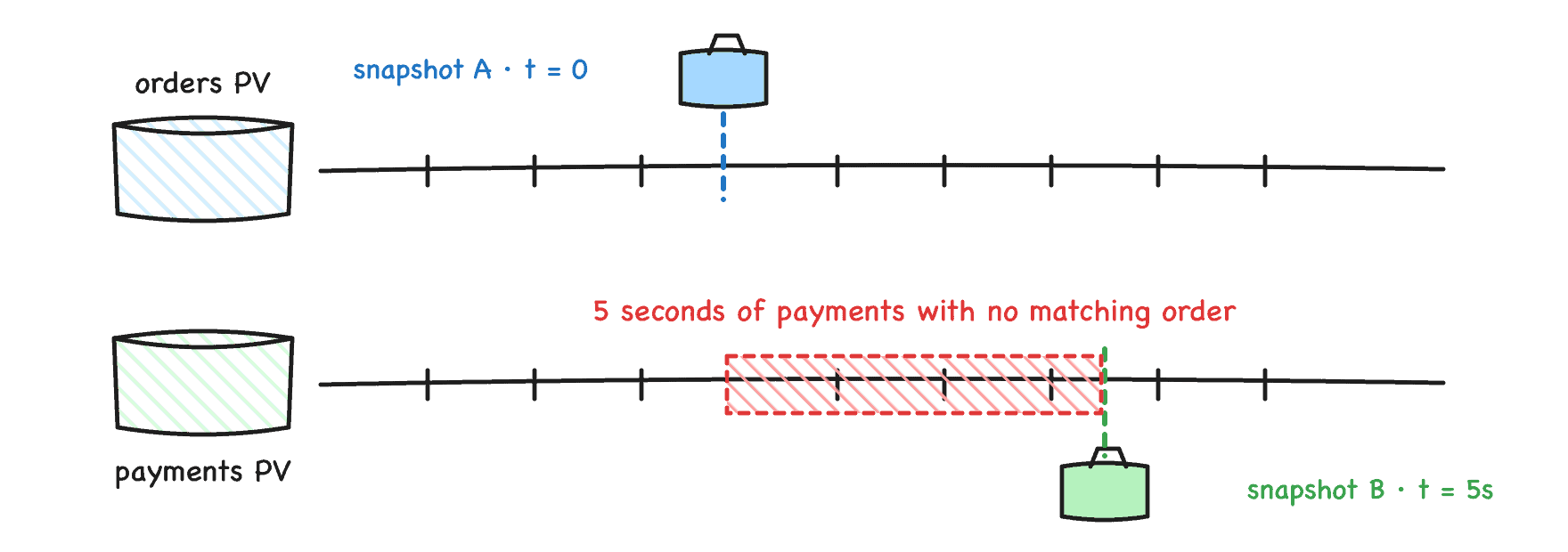
Two snapshots from different moments tear the data
Real stateful applications span multiple volumes: database data plus WAL, message broker partitions, replica sets. The lab stand-in writes matched pairs, order n to one PVC and payment n to another, five times a second, with one invariant: every payment must have its order.
Snapshotting the two volumes individually, five seconds apart, produced two snapshots that were each ReadyToUse and individually perfect. Restoring both and comparing the last committed sequence numbers:
last order committed   : 108352
last payment committed : 108377
[FAIL] 25 payments have NO matching order.
[FAIL] Each snapshot succeeded. The restore is still wrong.
Twenty five payments reference orders that do not exist. No component failed, every operation reported success, and the combined recovery point describes a moment in time that never existed. In production, that five second gap is a backup tool walking a list of a hundred PVCs one by one.
The API answer. VolumeGroupSnapshot reached GA in Kubernetes 1.36. One object selects PVCs by label, and the CSI driver receives one request for a coordinated, crash consistent recovery point across all of them:
apiVersion: groupsnapshot.storage.k8s.io/v1
kind: VolumeGroupSnapshot
metadata:
  name: ledger-group-snap
spec:
  volumeGroupSnapshotClassName: csi-hostpath-groupsnapclass
  source:
    selector:
      matchLabels:
        group: ledger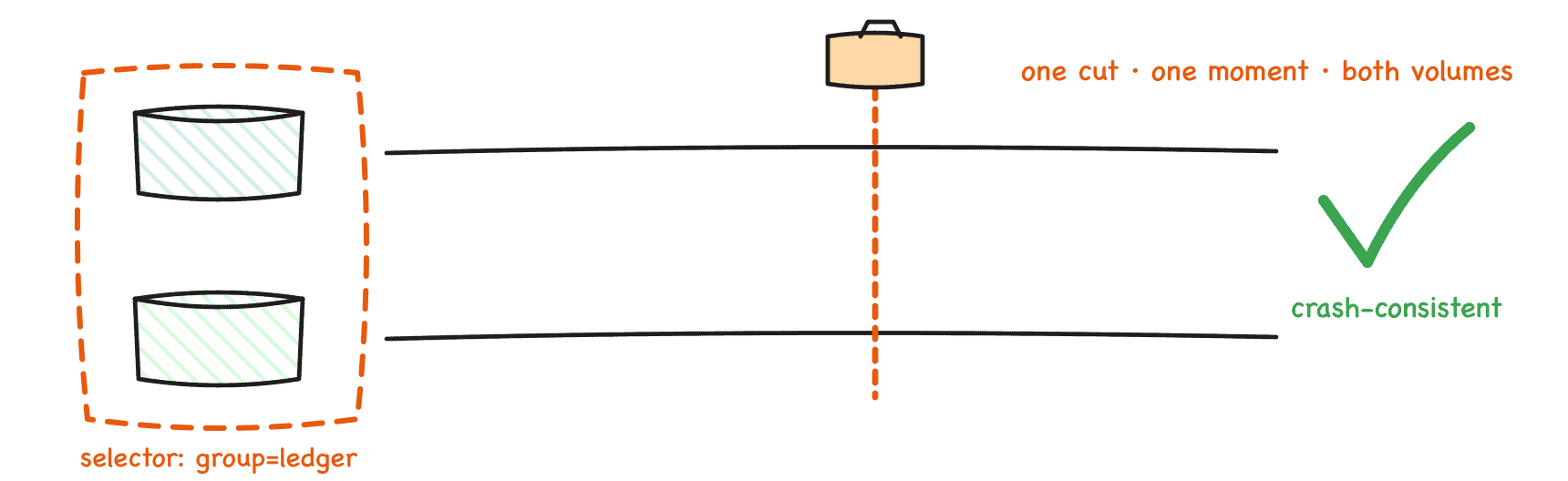
One group snapshot cuts both volumes at the same moment
Restoring the group’s member snapshots and running the same verifier:
last order committed   : 109169
last payment committed : 109169
[OK] Every payment has a matching order. Restore is consistent.
Caveats that apply beyond the lab:
- Support is driver specific. A driver that supports ordinary VolumeSnapshots proves nothing about group snapshots; the CSI group RPCs are a separate implementation. As of mid 2026, most of the major cloud drivers checked for the lab do not implement them.
- Setup is explicit: the CRDs and feature gates on the snapshot controller and CSI sidecar must be enabled by the operator.
- Crash consistent is not application consistent. The API removes cross volume timing skew; it does not flush or quiesce the database.
- The lab uses the CSI hostpath test driver, which implements the group RPCs but archives member volumes sequentially, so the writer is paused during the group snapshot to keep the demo deterministic. The point in time guarantee itself belongs to the storage backend of a production driver.
Recovery testing guidance
A recovery test is not deleting a pod and watching it return; that tests workload reconciliation. A recovery test:
- Restores a complete stateful application into a clean target that has never run it.
- Validates the data and the user path against expected contents, not against resource status.
- Measures the whole thing with a clock.
The principles that transfer from the lab to production as-is:
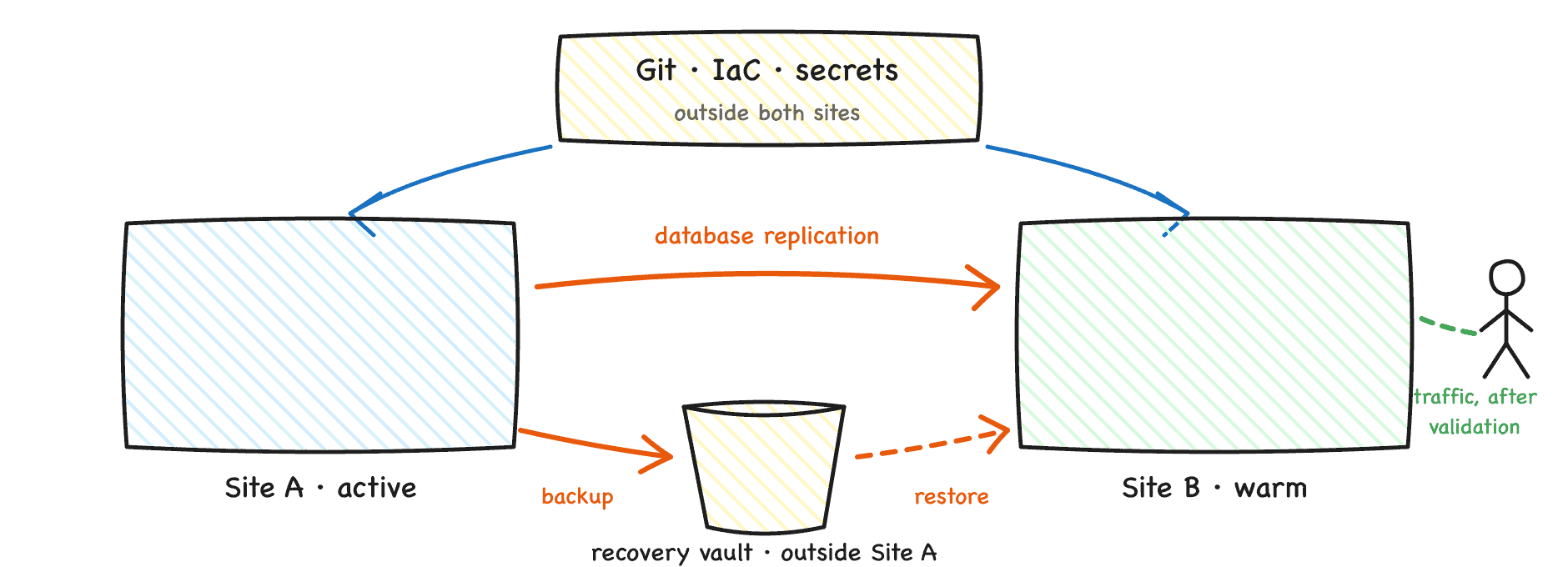
Two independent failure domains
Open gaps in the ecosystem
The scenarios expose gaps that no single tool closes today:
- No common cross-cluster failover contract. Data, workload, cluster, traffic, and identity each have tools, and every row is missing the same thing: a shared contract with the next row. Products answer this inside their own APIs; core Kubernetes does not define the sequence.
- No standard recovery unit for an application. Core Kubernetes has no maintained Application resource that says which objects, operators, data services, and external dependencies must recover together. Backup tools use namespaces and labels, GitOps controllers have their own application objects, package managers have releases, and each draws the boundary differently.
- Backup success is treated as recovery proof. Backup completion metrics are widely monitored; restore rehearsal results rarely are.
How to contribute
The Cloud Native Business Continuity initiative under CNCF TAG Operational Resilience is an open proposal seeking contributors, aiming at a landscape gap analysis, updated backup and DR guidance, and reference architectures: https://github.com/cncf/toc/issues/1779
References
- Reproducible lab: https://github.com/saiyam1814/kubecon-japan-dr-demo
- Velero, CNCF Sandbox: https://www.cncf.io/projects/velero/
- Velero backup hooks: https://velero.io/docs/v1.18/backup-hooks/
- VolumeGroupSnapshot GA announcement: https://kubernetes.io/blog/2026/05/08/kubernetes-v1-36-volume-group-snapshot-ga/
- Blog version of this document: https://blog.kubesimplify.com/a-backup-is-not-disaster-recovery