


CNCF hosts a Kubernetes cluster to run some services for internal purposes (namely; codimd, GUAC, kcp).
The Kubernetes Project announced the ingress-nginx retirement (not to be confused with NGINX or NGINX Ingress Controller), which also affects the above mentioned Cluster. So we started looking into alternatives.
After some discussions, we decided to continue with gateway-api and its implementation as Envoy Gateway.
Envoy Gateway is an CNCF open source project for managing Envoy Proxy as a standalone or Kubernetes-based application gateway. Gateway API resources are used to dynamically provision and configure the managed Envoy Proxies.
gateway api and ingress-nginx architectures
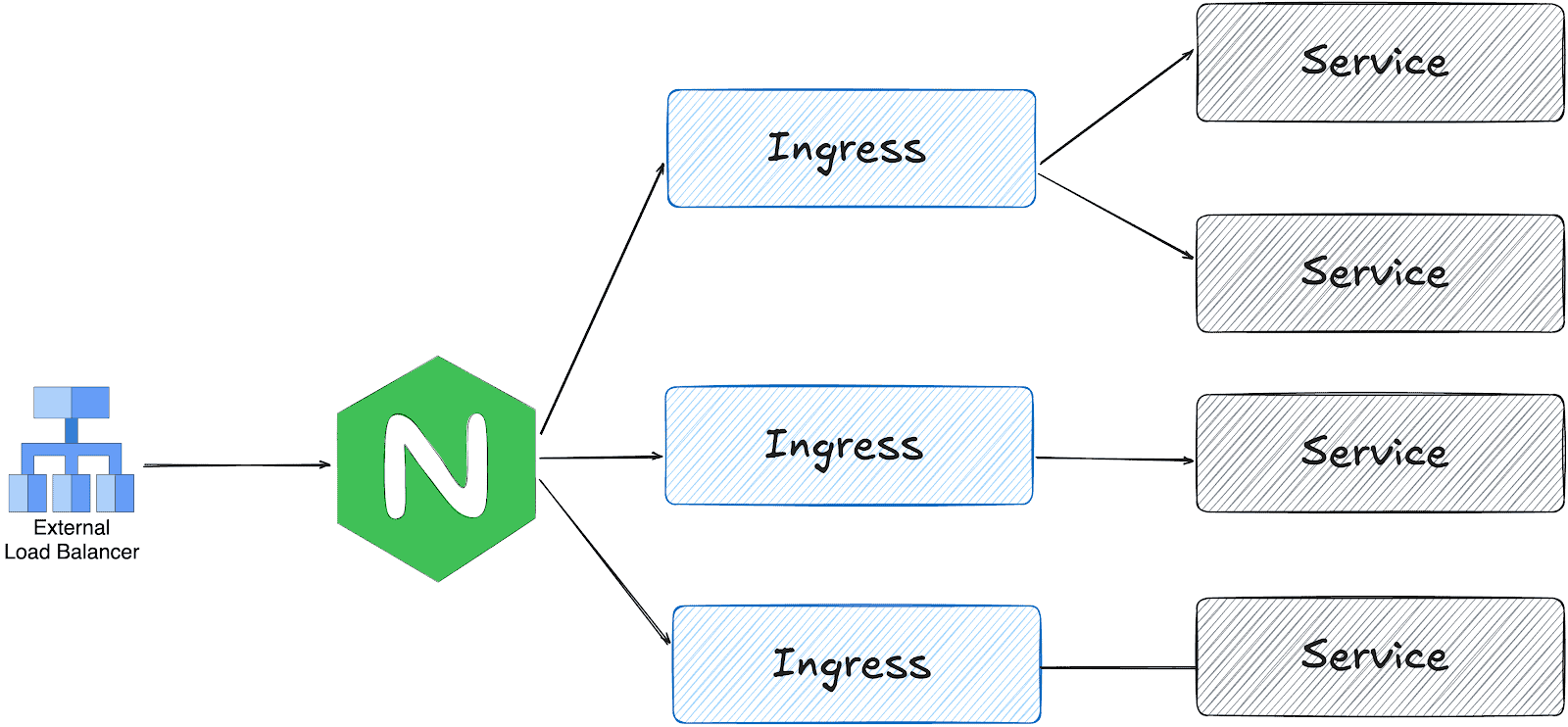
ingress-nginx works with one LoadBalancer service; the ingress controller receives all traffic and distributes it based on the Ingress object configuration.
On the other hand, gateway api is designed in multiple layers:
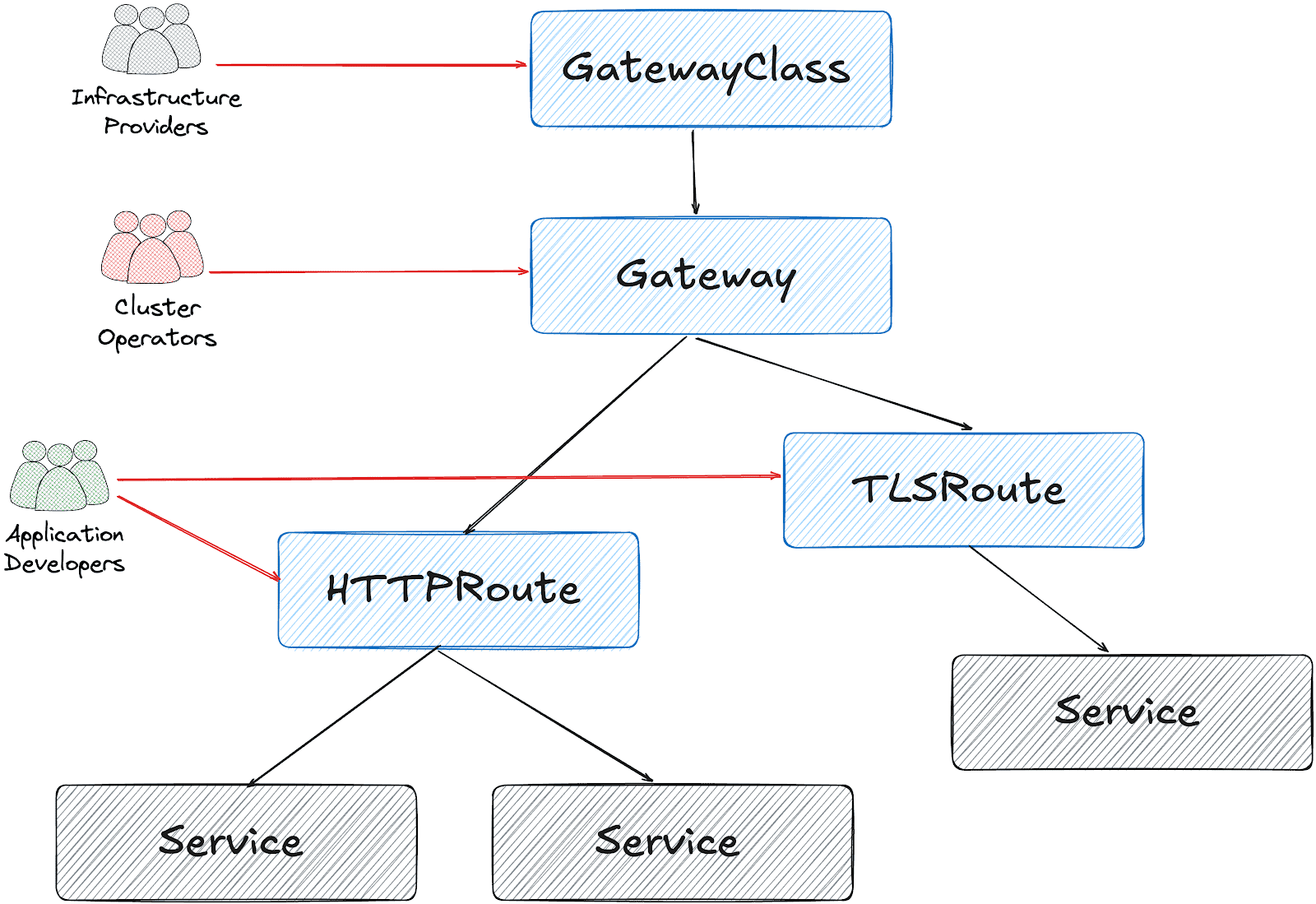
Based on this design, it’s possible to create a Gateway object per HTTPRoute and/or TLSRoute. (Each Gateway creates a LoadBalancer type service on the cluster)
Configuration for the services cluster
It’s possible to configure a shared Gateway object and configure it on multiple HTTPRoutes. This is the closest configuration to the current ingress-nginx deployment with some advantages like:
- Cost and Resource Efficiency: A single Gateway means one LoadBalancer service, which translates to one cloud load balancer. Multiple Gateways = multiple load balancers = significantly higher costs.
- Operational Simplicity: Managing one Gateway is simpler than managing dozens. We have a single point for TLS configuration, listeners, and overall gateway policy.
- IP Address Management: We get one stable IP for the ingress point. With multiple Gateways, we would need to manage multiple IPs and DNS entries.
This folder contains all the settings we implemented:
- GatewayClass to use Envoy Gateway
- A shared
Gatewayto serve for Guac, codimd, and kcp. EnvoyProxyto configure HPA, service type, and other proxy settings.ReferenceGrantsto allow the Gateway to access SSL certificates across namespacesHTTPRoutesfor each serviceBackendTLSPolictto handle existing nginx annotations for backend HTTPS connections
How we migrated
We had two options:
- Add Envoy Gateway with another public IP address and configure DNS to perform round-robin between ingress-nginx and Envoy
- Configure Envoy Gateway to use the current IP address and move the whole traffic in one go.
Although the first option is safer, we chose the second for the simplicity of our operation.
The reserved IP address was pushed to the repo as part of EnvoyProxy configuration:
apiVersion: gateway.envoyproxy.io/v1alpha1
kind: EnvoyProxy
metadata:
  name: ha-envoy-proxy
  namespace: envoy-gateway
spec:
  provider:
    type: Kubernetes
    kubernetes:
      envoyService:
        externalTrafficPolicy: Cluster
        type: LoadBalancer
        patch:
          type: StrategicMerge
          value:
            spec:
              loadBalancerIP: "146.235.214.235" # Reserved IP address on the cloud provider
              ports:
              - name: https-443
                port: 443
                targetPort: 10443
                protocol: TCP
                nodePort: 32050 # Fixed NodePort for external LB backend and firewall configuration
...
Critical: externalTrafficPolicy Setting
We initially encountered connection failures due to externalTrafficPolicy: Local (the default). This setting causes the NodePort to only listen on nodes that have an Envoy pod running. When the Oracle Cloud Load Balancer performed health checks on nodes without pods, they failed, marking all backends as unhealthy.
What about certificates?
We chose to use the existing certificates triggered by ingress-nginx via annotations:
---
apiVersion: gateway.networking.k8s.io/v1
kind: Gateway
...
spec:
  gatewayClassName: envoy
  listeners:
  - name: https
    protocol: HTTPS
    port: 443
    hostname: "*.cncf.io"
    tls:
      mode: Terminate
      certificateRefs:
      - name: guac-tls
        namespace: guac
        kind: Secret
        group: ""
      - name: auth-dex-tls
        namespace: auth
        kind: Secret
        group: ""
...
However, the certificates have an owner reference to the Ingress object. This means deleting an Ingress would cascade delete the Certificate and its Secret.
Below one-liner, removes the ownerReference from all Certificates that reference an Ingress:
kubectl get certificate -A -o json | jq -r '.items[] | select(.metadata.ownerReferences[]? | .kind == "Ingress") | "\(.metadata.namespace) \(.metadata.name)"' | while read NS NAME
do
    kubectl patch certificate $NAME -n $NS --type=json \
      -p='[{"op": "remove", "path": "/metadata/ownerReferences"}]'
done
Cross-namespace certificate access
Since certificates are stored in different namespaces than the Gateway, we configured ReferenceGrant resources to allow cross-namespace access:
apiVersion: gateway.networking.k8s.io/v1beta1
kind: ReferenceGrant
metadata:
  name: allow-gateway-to-certs
  namespace: codimd
spec:
  from:
  - group: gateway.networking.k8s.io
    kind: Gateway
    namespace: envoy-gateway
  to:
  - group: ""
    kind: Secret
    name: codimd-tls
This pattern was repeated for each namespace containing certificates.
HTTPRoutes
ingress2gateway helped to prepare the HTTPRoute objects from existing Ingress resources.
We had a special case for one ingress with backend HTTPS configuration:
nginx.ingress.kubernetes.io/backend-protocol: HTTPS
nginx.ingress.kubernetes.io/proxy-ssl-name: api.services.cncf.io
nginx.ingress.kubernetes.io/proxy-ssl-secret: kdp/kcp-ca
nginx.ingress.kubernetes.io/proxy-ssl-verify: "on"
To achieve the same behavior with Envoy Gateway, we created a BackendTLSPolicy:
apiVersion: gateway.networking.k8s.io/v1
kind: BackendTLSPolicy
metadata:
  name: kdp-backend-tls
  namespace: kdp
spec:
  targetRefs:
  - group: ''
    kind: Service
    name: kcp-front-proxy
  validation:
    caCertificateRefs:
    - name: kcp-ca
      group: ''
      kind: Secret
    hostname: api.services.cncf.io
Troubleshooting
TLS handshake failures
If you encounter SSL_ERROR_SYSCALL errors during TLS handshake:
- Check Gateway listener: Ensure the HTTPS listener is configured on port 443
- Verify certificates are loaded: Check that all referenced certificates exist and are accessible
- Check ReferenceGrants: Ensure cross-namespace certificate access is allowed
- Review Envoy logs:
kubectl logs -n envoy-gateway-system -l gateway.envoyproxy.io/owning-gateway-name=shared-gatewayLoad balancer health check failures
If the cloud load balancer shows backends as unhealthy:
- Verify externalTrafficPolicy: Should be Cluster, not Local
- Check NodePort accessibility: Test from a node that the NodePort responds
- Review health check configuration: Ensure the LB health check matches the service configuration
- Check firewall rules: Verify security groups/NSGs allow traffic from LB subnet to NodePort
Certificate not being served
If OpenSSL can’t retrieve a certificate:
echo | openssl s_client -connect <lb-ip>:443 -servername <hostname> 2>/dev/null | openssl x509 -noout -textThis indicates the certificate isn’t loaded. Check:
- Certificate is referenced in Gateway certificateRefs
- ReferenceGrant exists for cross-namespace access
- Gateway status shows Programmed: True
Day 2 operation on certificates
We had decided to move the certificates later, to narrow the scope of the migration and easily use the current certificates at the time. However, when they expire, we could be in trouble. Here is what you need to do make sure that your certificates are managed by Gateway API + cert-manager:
1. Make sure that cert-manager supports Gateway API:
You need to enable Gateway API support on cert-manager:
apiVersion: argoproj.io/v1alpha1
kind: Application
metadata:
  name: cert-manager
  namespace: argocd
spec:
  project: default
  source:
    repoURL: https://charts.jetstack.io
    targetRevision: v1.17.2
    chart: cert-manager
    helm:
      values: |
        config:
          enableGatewayAPI: true ## Make sure this exists!
2. Update the ClusterIssuer:
Either update the current issuer or create a new one:
apiVersion: cert-manager.io/v1
kind: ClusterIssuer
metadata:
  name: letsencrypt-prod
spec:
  acme:
    preferredChain: ""
    privateKeySecretRef:
      name: letsencrypt-prod
    server: https://acme-v02.api.letsencrypt.org/directory
    solvers:
    - http01:
        gatewayHTTPRoute:
          parentRefs:
          - group: gateway.networking.k8s.io
            kind: Gateway
            name: shared-gateway       ## this is the name of your gateway
            namespace: envoy-gateway   ## where your gateway resides
3. Annotate the Gateway for cert-manager
You need to add the annotation, just like we do for ingress-nginx:
apiVersion: gateway.networking.k8s.io/v1
kind: Gateway
metadata:
  name: shared-gateway
  namespace: envoy-gateway
  annotations:
    # needs to match with the ClusterIssuer you created/updated on previous step
    cert-manager.io/cluster-issuer: letsencrypt-prod
spec:
  gatewayClassName: envoy
4. Separate the listeners
We initially had one listener for all our hosts, but they need to be separated (unless you use DNS solver for a wildcard certificate).
apiVersion: gateway.networking.k8s.io/v1
kind: Gateway
metadata:
  name: shared-gateway
  namespace: envoy-gateway
  annotations:
    cert-manager.io/cluster-issuer: letsencrypt-prod
spec:
  gatewayClassName: envoy
  addresses:
   - type: IPAddress
     value: 146.235.214.235
  listeners:
  - name: https-guac
    protocol: HTTPS
    port: 443
    hostname: guac.cncf.io
    tls:
      mode: Terminate
      certificateRefs:
      - name: guac-tls-gw
        kind: Secret
        group: ""
    allowedRoutes:
      namespaces:
        from: All

    # added for cert-manager HTTP01 solver
  - name: http-guac
    protocol: HTTP
    port: 80
    hostname: guac.cncf.io
    allowedRoutes:
      namespaces:
        from: All

  - name: http-api-guac
    protocol: HTTP
    port: 80
    hostname: api.guac.cncf.io
    allowedRoutes:
      namespaces:
        from: All

    # added for cert-manager HTTP01 solver
  - name: https-notes
    protocol: HTTPS
    port: 443
    hostname: notes.cncf.io
    tls:
      mode: Terminate
      certificateRefs:
      - name: codimd-tls
        kind: Secret
        group: ""
    allowedRoutes:
      namespaces:
        from: All

  - name: http-notes
    protocol: HTTP
    port: 80
    hostname: notes.cncf.io
    allowedRoutes:
      namespaces:
        from: All
...
5. Remove redundant ReferenceGrants
Since the new certificates are created on the same namespace with the Envoy Gateway (shared-gateway in our case), we don’t need the ReferenceGrants anymore. We removed them:
kubectl delete referencegrant --all -AConclusion
The migration from ingress-nginx to Envoy Gateway required careful attention to:
- Certificate ownership and cross-namespace access
- Cloud load balancer integration (NodePort, health checks, externalTrafficPolicy)
- Backend TLS configuration for services requiring HTTPS upstream connections
The Gateway API’s multi-layer architecture provides better separation of concerns compared to ingress-nginx, though it requires understanding additional resources like ReferenceGrants and BackendTLSPolicy.
To sum it up, we can say that the cloud native world already provided alternatives before the sun setting of ingress nginx. We hope this small insight can help you in your journey of migrating away from ingress nginx.