


On November 6th, the Lima project team shipped the second major release of Lima. In this release, the team are expanding the project focus to cover AI as well as containers.
What is Lima ?
Lima (Linux Machines) is a command line tool to launch a local Linux virtual machine, with the primary focus on running containers on a laptop.
The project began in May 2021, with the aim of promoting containerd including nerdctl (contaiNERD CTL) to Mac users. The project joined the CNCF in September 2022 as a Sandbox project, and was promoted to the Incubating level in October 2025. Through the growth of the project, the scope has expanded to support non-container workloads and non-macOS hosts too.
See also: “Lima becomes a CNCF incubating project”.
Updates in v2.0
Plugins
Lima now provides the plugin infrastructure that allows third-parties to implement new features without modifying Lima itself:
- VM driver plugins: for additional hypervisors.
- CLI plugins: for additional subcommands of the `limactl` command.
- URL scheme plugins: for additional URL schemes to be passed as `limactl create SCHEME:SPEC` .
The plugin interfaces are still experimental and subject to change. The interfaces will be stabilized in future releases.
GPU acceleration
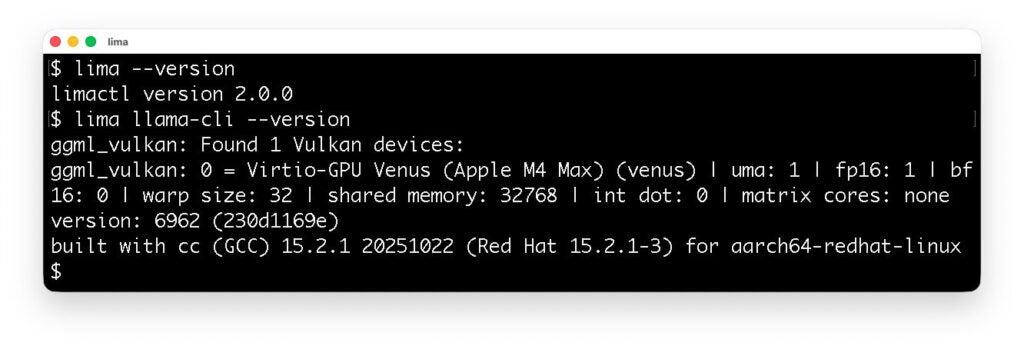
Lima now supports the VM driver for krunkit, providing GPU acceleration for Linux VM running on macOS hosts.
The following screenshot shows that llama.cpp running in Lima detects the Apple M4 Max processor as a virtualized GPU.
Model Context Protocol
Lima now provides Model Context Protocol (MCP) tools for reading, writing, and executing local files using a VM sandbox:
globlist_directoryread_filerun_shell_commandsearch_file_contentwrite_file
Lima’s MCP tools are inspired by Google Gemini CLI’s built-in tools, and can be used as a secure alternative for those built-in tools. See the configuration guide here: https://lima-vm.io/docs/config/ai/outside/mcp/
Other improvements
- The
`limactl start`command now accepts the`--progress`flag to show the progress of the provisioning scripts. - The `
limactl (create|edit|start)`commands now accept the`--mount-only DIR`flag to only mount the specified host directory. In Lima v1.x, this had to be specified in a very complex syntax:`--set ".mounts=[{\"location\":\"$(pwd)\", \"writable\":true}]"` . - The
`limactl shell`command now accepts the`--preserve-env`flag to propagate the environment variables from the host to the guest. - UDP ports are now forwarded by default in addition to TCP ports.
- Multiple host users can now run Lima simultaneously. This allows running Lima as a separate user account for enhanced security, using “Alcoholless” Homebrew.
See also the release note: https://github.com/lima-vm/lima/releases/tag/v2.0.0 .
We appreciate all the contributors who made this release possible, especially Ansuman Sahoo who contributed the VM driver plugin subsystem and the krunkit VM driver, through the Google Summer of Code (GSoC) 2025.
Expanding the focus to hardening AI
While Lima was originally made for promoting containerd to Mac users, it has been known to be useful for a variety of other use cases as well. One of the most notable emerging use cases is to run an AI coding agent inside a VM in order to isolate the agent from direct access to host files and commands. This setup ensures that even if an AI agent is deceived by malicious instructions searched from the Internet (e.g., fake package installations), any potential damage is confined within the VM or limited to files specified to be mounted from the host.
There are two kinds of scenarios to run an AI agent with Lima: AI inside Lima, and AI outside Lima.
AI inside Lima
This is the most common scenario; just run an AI agent inside Lima. The documentation features several examples of hardening AI agents running in Lima:
A local LLM can be used too, with the GPU acceleration feature available in the krunkit VM driver.
AI outside Lima

This scenario refers to running an AI agent as a host process outside Lima. Lima covers this scenario by providing the MCP tools that intercept file accesses and command executions.
Getting started: AI inside Lima
This section introduces how to run an AI agent (Gemini CLI) inside Lima so as to prevent the AI from directly accessing host files and commands.
If you are using Homebrew, Lima can be installed using:
brew install limaFor other installation methods, see https://lima-vm.io/docs/installation/ .
An instance of the Lima virtual machine can be created and started by running `limactl start`. However, as the default configuration mounts the entire home directory from the host, it is highly recommended to limit the mount scope to the current directory (.), especially when running an AI agent:
mkdir -p ~/test
cd ~/test
limactl start --mount-only .
To allow writing to the mount directory, append the `:w` suffix to the mount specification:
limactl start --mount-only .:wFor example, you can run AI agents such as Gemini CLI. This can be installed and executed inside Lima using the `lima` commands as follows:
lima sudo snap install node --classic
lima sudo npm install -g @google/gemini-cli
lima gemini
Gemini CLI can arbitrarily read, write, and execute files inside the VM, however, it cannot access host files except mounted ones.
To run other AI agents, see https://lima-vm.io/docs/examples/ai/.