

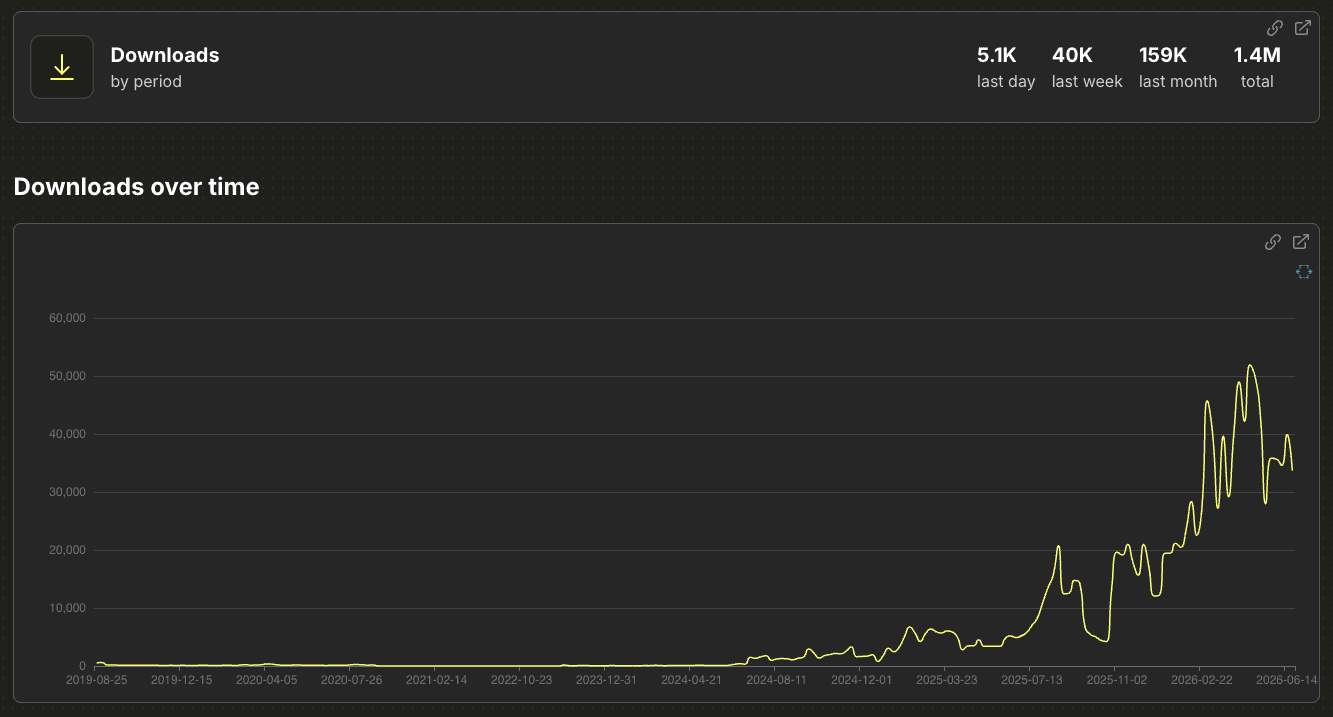
The unified kubeflow-sdk has officially crossed 1 million downloads on PyPI!
This milestone reflects the rapid adoption of this streamlined interface. In this post, we celebrate this community milestone and highlight the core concepts driving the SDK’s design, along with a look at how it simplifies distributed training.
History: From multiple tools to one import kubeflow
Scaling AI workloads shouldn’t require deep expertise in distributed systems and container orchestration. Whether anyone is prototyping on local hardware or deploying to a production Kubernetes cluster, we needed a unified API that abstracts infrastructure complexity while preserving flexibility.
Historically, the typical journey of an ML engineer going to production on Kubeflow was incredibly fragmented: prototype locally on a laptop, rewrite the entire code for distributed training, rebuild container images for every minor change, write complex Kubernetes YAML manifests, wrestle with `kubectl`, and juggle multiple disconnected APIs. At the same time, the community struggled to maintain multiple separate SDKs across individual subprojects like `kubeflow-training`, `kubeflow-katib`, and `model-registry`. Each step demanded different tools and mental models, draining focus and slowing down innovation.
To address these challenges, the Kubeflow community launched the Kubeflow SDK & ML Experience Working Group (WG). KEP-2170: Kubeflow Trainer V2 API rebuilt Trainer’s API with a Python-first client as an explicit design goal rather than an afterthought. That raised an obvious question for the rest of the ecosystem: why should every other component reinvent this? That question led to the Kubeflow SDK & ML Experience Working Group, chartered to build one unified Python interface across Kubeflow instead of another one-off client.
The WG’s work shipped as pip install kubeflow in November 2025, with TrainerClient and OptimizerClient as the first two unified clients. Less than a year later, it’s crossed 1 million downloads.
Under a single import kubeflow, it translates clean Python into the Kubernetes resources your cluster needs (like TrainJob, Experiment, and other CRDs) without you ever touching a manifest.
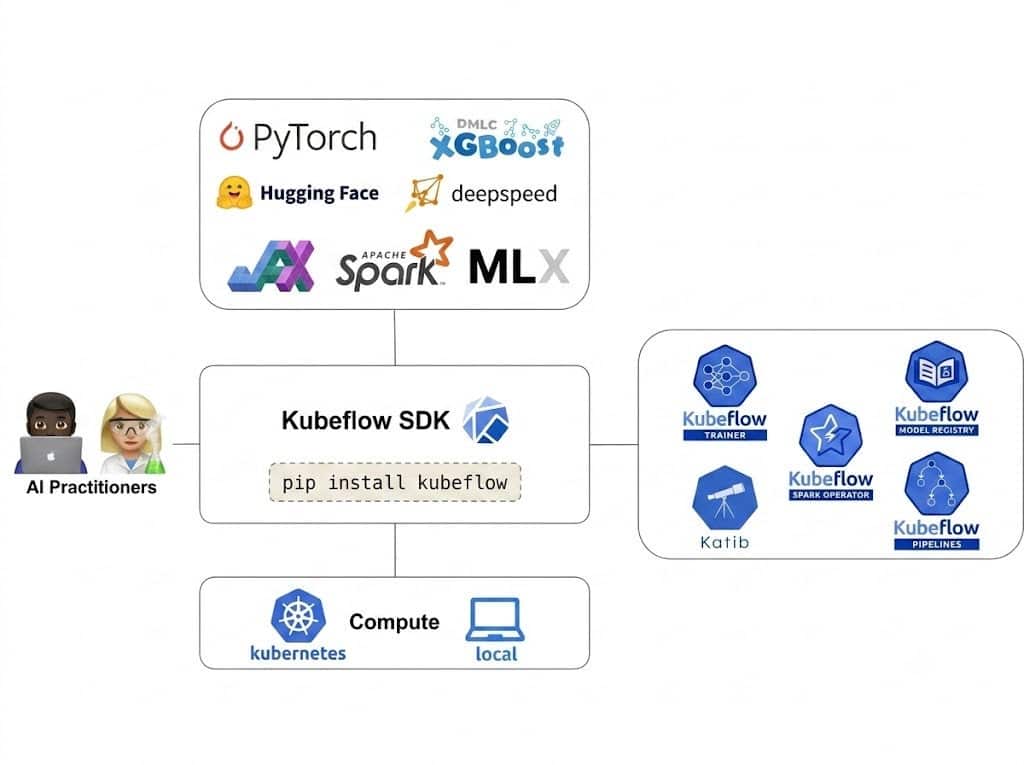
What Makes It Work: The Design Principles Behind the SDK
The rapid adoption of the SDK is driven by three core design pillars:
1. Pythonic Simplicity — Zero YAML Required
Data scientists configure resources, define hyperparameters, and launch distributed training runs using native Python. No Kubernetes manifest authoring, no YAML indentation debugging.
2. Multi-Backend Portability
The SDK supports three execution backends with the same API, letting you graduate from laptop to cluster without rewriting code:
| Backend | When to use |
| Local Process | Fastest iteration — runs your training function as a Python subprocess, zero infrastructure overhead |
| Container (Docker/Podman) | Production-like environment on your laptop — same dependencies, same Python version, same system libraries |
| Kubernetes | Production scale — submits a full distributed TrainJob managed by Kubeflow Trainer, with fault tolerance and resource scheduling |
Switching between them is a one-line config change — the training code itself never changes.
3. A Cohesive ML Lifecycle — Built for Two Personas
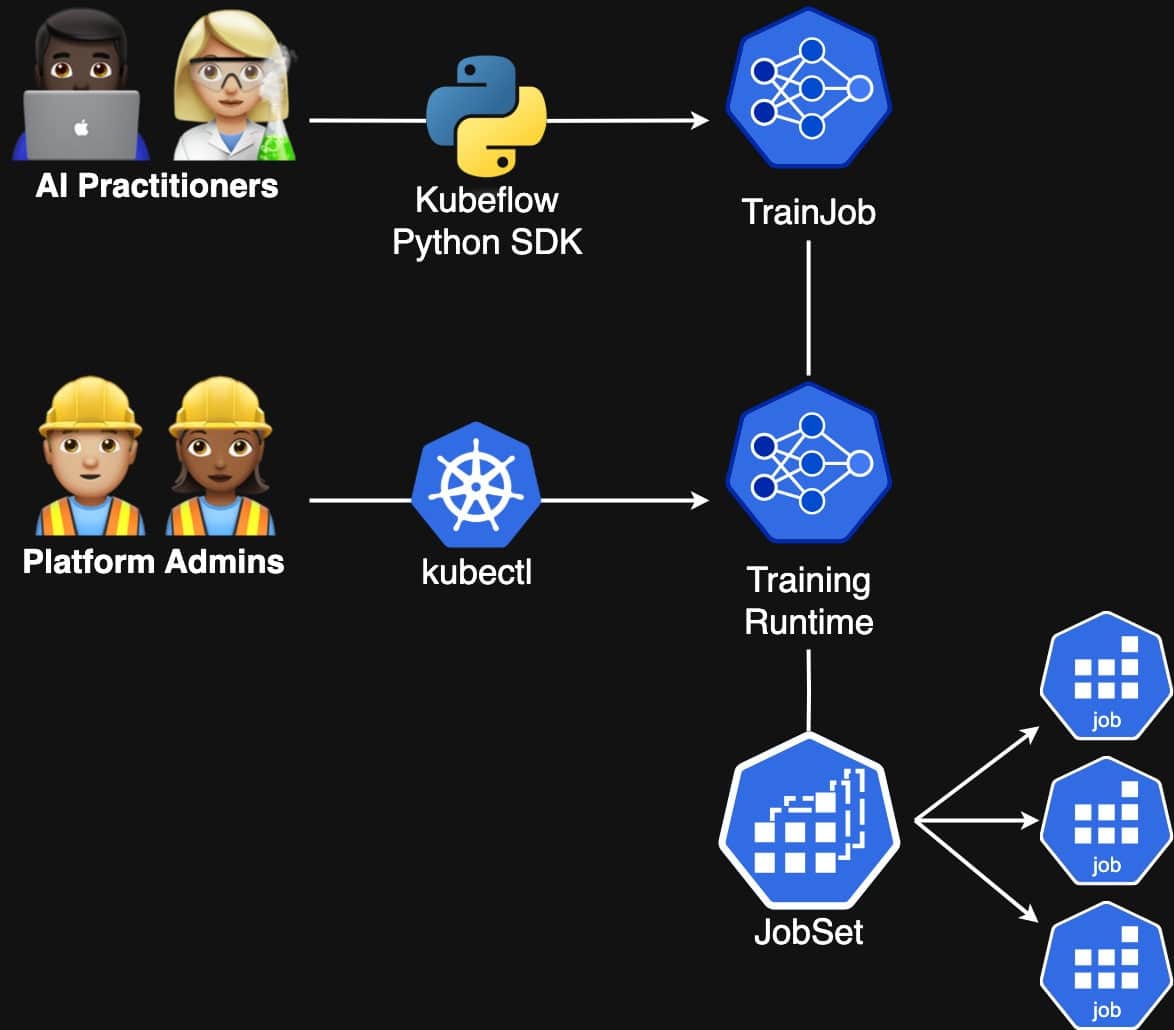
The SDK draws a clean line between two user types that Kubeflow serves:
- AI Practitioners (data scientists, ML engineers) use the SDK to submit jobs and manage workflows entirely in Python, without touching YAML or kubectl
- Platform Administrators manage infrastructure — installing components, configuring runtimes, setting resource quotas — nothing on their side changes
For practitioners, the SDK organizes the full AI lifecycle into dedicated client modules. Here’s the current state of ecosystem integration:
| Subproject | Integration | Functional Overview |
| Trainer | ✅ Available | Distributed model training and fine-tuning engine |
| Katib | ✅ Available | Automated tuning of model hyperparameters |
| Model Registry | ✅ Available | Centralized tracking of versions and artifacts |
| Spark | ✅ Available | Large-scale data and feature processing |
| Pipelines | ✅ Available | Native orchestration for ML workflow management |
Distributed PyTorch training in 15 lines
The following snippet shows how TrainerClient abstracts away the complexity of distributed execution — no manual MASTER_ADDR, WORLD_SIZE, or RANK setup required:
from kubeflow.trainer import TrainerClient, CustomTrainer

def train_model():
    import torch
    import torch.nn as nn

    model = nn.Linear(10, 1)
    # Your training loop here
    print("Training job complete!")

client = TrainerClient()

job_name = client.train(
    trainer=CustomTrainer(
        func=train_model,
        num_nodes=2,
        resources_per_node={"cpu": "2", "memory": "4Gi"}
    )
)

print(f"Distributed training job '{job_name}' is running on Kubernetes.")
Behind the scenes, the SDK:
- Serializes the training function and its dependencies
- Dynamically generates the TrainJob CRD and submits it to the Training Operator
- Orchestrates distributed nodes and injects cluster communication environment variables automatically
What used to require dozens of lines of YAML and Kubernetes expertise now fits comfortably in a single Python file.
More Examples
The SDK streamlines the machine learning lifecycle by organizing core functionalities into dedicated, Pythonic client modules:
- SparkClient: Handles large-scale data preprocessing. See the Basic Spark Client Example to begin iterating.
- TrainerClient: Powering distributed model training across PyTorch, DeepSpeed, and TensorFlow. Explore the PyTorch MNIST Training Notebook or the DeepSpeed Text Summarization Notebook.
- OptimizerClient: Automates hyperparameter tuning via Katib experiments with zero YAML overhead.
- PipelinesClient: Orchestrates end-to-end automated workflows by chaining preprocessing, training, and tuning into native KFP pipelines. Quick Example
For additional implementation patterns, visit the official Kubeflow SDK Examples Page.
User Survey: What Practitioners Want
To align our roadmap directly with developer needs, we recently ran a community survey (detailed in the Kubeflow SDK User Survey Insights). When asked what they want most, users highlighted three key priorities:
1. Simplified Infrastructure Configuration: Less time setting up compute resources for distributed runs.
2. Better Debugging: Cohesive logs and distributed tracing to troubleshoot remote failures.
3. Faster Iterative Workflows: Speeding up local prototyping before migrating jobs to the cloud.
What we’re building next
Crossing one million downloads motivates us to push further. These insights directly shape the top priorities for our 2026 roadmap:
Kubeflow SDK MCP Server — Exposing the Kubeflow SDK as AI-callable tools via the Model Context Protocol, enabling AI agents and coding assistants to directly orchestrate training jobs, hyperparameter sweeps, and Spark workloads on behalf of developers.
OpenTelemetry Integration — Adding end-to-end observability across the SDK with structured logging and distributed tracing, so platform teams can monitor and debug ML workloads with the same tooling they use for the rest of their infrastructure.
Dynamic LLM Trainer Framework — Purpose-built trainer abstractions for large language model fine-tuning, including GPU support in the container backend and transparent GPU checkpointing via CRIU for resilient long-running training jobs.
For the full list of planned work, see the Kubeflow SDK 2026 Roadmap.
Join the Community
The Kubeflow SDK needs your help and suggestions. We welcome contributions, feedback, and participation from everyone! Join us in any of below ways
Connect with the Community
- Join #kubeflow-ml-experience on CNCF Slack
- Attend the Kubeflow SDK and ML Experience WG meetings
- Check out good first issues to get started
How to get Started
- For the installation, follow the installation guide for Kubeflow SDK.
- Train your first model with Kubeflow SDK using the quickstart guide.
Resources
- Github: https://github.com/kubeflow/sdk
- Documentation: https://www.kubeflow.org/docs/components/sdk/
- Talks: Streamlining ML Workflows With the Unified Kubeflow SDK – Anna Kramar & Antonin Stefanutti, Red Hat
- Demo: Kubeflow SDK Demo – LLM Fine-Tuning with BuiltinTrainer