


Infrastructure provisioning in Kubernetes has become increasingly automated, but secret management often remains a challenge as environments grow. Organizations commonly separate development, staging, and production workloads across clusters, namespaces, or cloud accounts to improve security and reduce blast radius. While this isolation is beneficial, it introduces a recurring operational problem: how should shared credentials be distributed and rotated consistently across those boundaries? Our team recently faced this while designing a scalable environment for a client running on AWS EKS.
The problem we set out to solve is not unique to AWS, or to cloud infrastructure in general. Whether you’re running on Azure, Google Cloud, a multi-cloud setup, on-premise infrastructure, or automating local development environments with tools like KIND or Minikube, the pain point remains identical: ensuring seamless secret replication across isolated boundaries. Each environment (Dev, Staging, Prod) resides in its own distinct account, namespace, or cluster. This separation is excellent for security and blast radius mitigation, but it introduces significant operational complexity. How do you replicate shared secrets across these isolated environments without manual copy-pasting?
This article explains how we solved the multi-account secret synchronization problem using External Secrets Operator (ESO) and Bitwarden Secrets Manager.
The challenge: Managing shared secrets across isolated environments
Our client runs two applications with heavy dependencies on third-party integrations. We hit a wall when designing automation for provisioning new environments:
- Shared credentials: In non-production environments, the applications share identical “sandbox” credentials for third-party tools.
- Fragmented storage: Each EKS cluster lives in a separate AWS account. Using AWS Secrets Manager per account meant that when a third-party API key rotated, we had to manually update it across every single AWS account.
Centralized management: We wanted a single source of truth for shared credentials so that secret rotation could occur in one location and automatically propagate to consuming environments.The fundamental requirement was separating secret storage from secret consumption.
The solution: External Secrets Operator as the bridge
We selected External Secrets Operator (ESO) because it provides a Kubernetes-native reconciliation model for synchronizing secrets from external secret management systems into Kubernetes Secret API.. This allows applications to continue consuming standard Kubernetes Secrets while the source of truth remains external to the cluster.
For backend storage, we selected Bitwarden Secrets Manager. The reasoning was pragmatic: our client already used Bitwarden’s Password Manager organization-wide. This made it easy for us to recommend using their Secrets Manager solution, which allowed us to maintain access controls for the organization in one place.
One of ESO’s strengths is its provider-agnostic design. The operator supports numerous secret backends, including HashiCorp Vault, AWS Secrets Manager, Azure Key Vault, Google Secret Manager, Bitwarden Secrets Manager, and others. In this implementation, we selected Bitwarden because it aligned with the client’s existing credential-management practices. The pattern remains the same regardless of provider: store secrets centrally, let ESO sync them to Kubernetes Secrets in every cluster across all accounts.
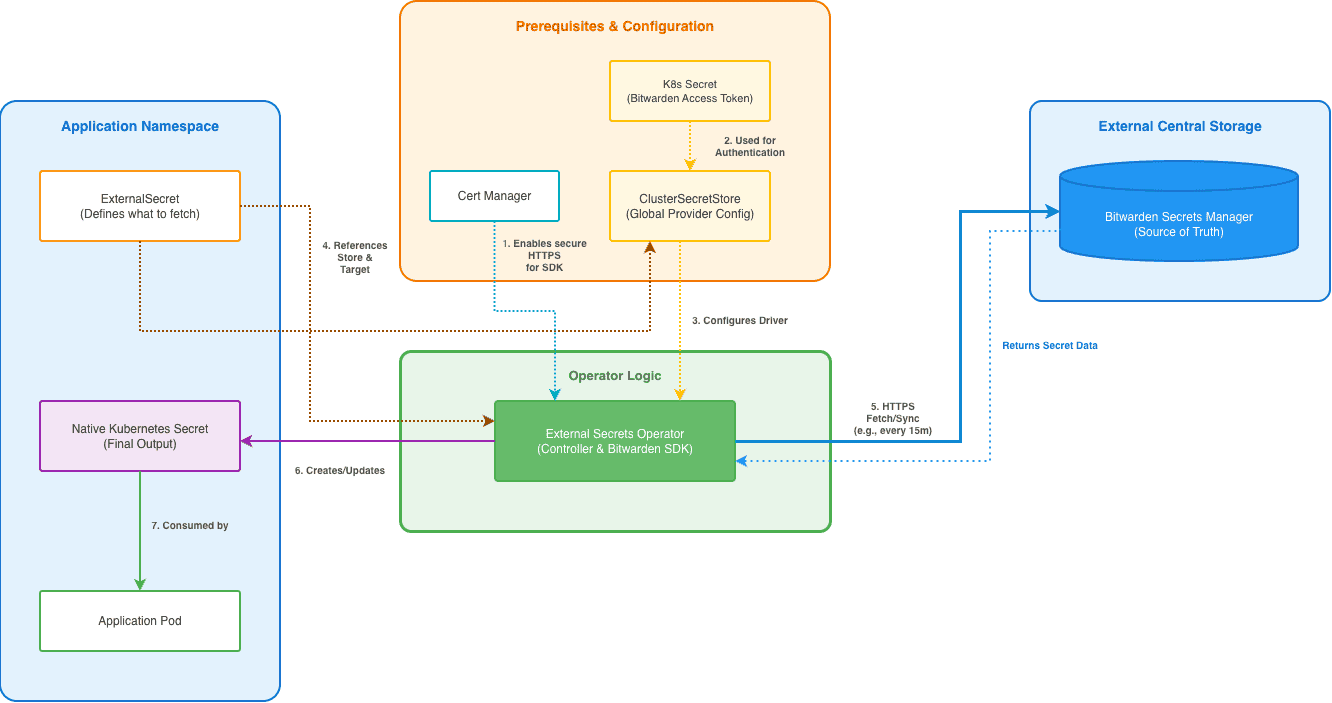
How the architecture works
At a high level, the architecture consists of three components:
- A centralized secret management system that serves as the source of truth.
- External Secrets Operator running within each Kubernetes cluster.
- Kubernetes Secrets generated and maintained by ESO for application consumption.
When an ExternalSecret resource is created, ESO retrieves the referenced secret from the external provider and creates or updates the corresponding Kubernetes Secret. The reconciliation loop continuously checks for updates and synchronizes changes according to the configured refresh interval.
This approach decouples secret storage from secret consumption while allowing applications to continue using standard Kubernetes-native mechanisms.
The Implementation
Below is a step-by-step guide to configure this in a Kubernetes environment. While we automated all of these resources using Terraform, this guide presents the direct commands for clarity purposes. For the automation code, refer to this GitHub repository.
Prerequisites
- A Kubernetes Cluster (EKS, AKS, GKE, or other).
- kubectl and helm installed locally.
- Access to a supported secret management provider. This example uses Bitwarden Secrets Manager, but the same workflow can be adapted to other providers supported by External Secrets Operator.
Step 1: Secure the Communication Between ESO and Bitwarden SDK
The integration between ESO and the Bitwarden SDK requires secure HTTPS communication.
- To handle TLS certificates dynamically within the cluster, we first installed Cert Manager.
helm repo add jetstack https://charts.jetstack.io
helm repo update

helm install cert-manager jetstack/cert-manager \
  --namespace cert-manager \
  --create-namespace \
  --set installCRDs=true
2. Create a Self-Signed ClusterIssuer:
cat <<EOF | kubectl apply -f -
apiVersion: cert-manager.io/v1
kind: ClusterIssuer
metadata:
  name: bitwarden-bootstrap-issuer
spec:
  selfSigned: {}
EOF
3. Create the external-secrets namespace and generate the Root CA Certificate in this namespace:
kubectl create namespace external-secrets

cat <<EOF | kubectl apply -f -
apiVersion: cert-manager.io/v1
kind: Certificate
metadata:
  name: bitwarden-bootstrap-certificate
  namespace: external-secrets
spec:
  commonName: bitwarden-tls-ca
  isCA: true
  secretName: bitwarden-ca-certs
  issuerRef:
    name: bitwarden-bootstrap-issuer
    kind: ClusterIssuer
EOF
4. Create the Local Issuer and Final TLS Certificate that will be used by the Bitwarden SDK server for its HTTPS endpoint.
cat <<EOF | kubectl apply -f -
apiVersion: cert-manager.io/v1
kind: Issuer
metadata:
  name: bitwarden-certificate-issuer
  namespace: external-secrets
spec:
  ca:
    secretName: bitwarden-ca-certs
---
apiVersion: cert-manager.io/v1
kind: Certificate
metadata:
  name: bitwarden-tls-certs
  namespace: external-secrets
spec:
  secretName: bitwarden-tls-certs
  dnsNames:
    - bitwarden-sdk-server.external-secrets.svc.cluster.local
    - external-secrets-bitwarden-sdk-server.external-secrets.svc.cluster.local
    - localhost
  issuerRef:
    name: bitwarden-certificate-issuer
    kind: Issuer
EOF
Step 2: Install External Secrets Operator with Bitwarden support
Next, we installed ESO. It is crucial here to enable the Bitwarden SDK specifically, as it spins up the necessary service to communicate with the Bitwarden API.
helm repo add external-secrets https://charts.external-secrets.io

helm install external-secrets external-secrets/external-secrets \
  --namespace external-secrets \
  --set installCRDs=true \
  --set "bitwarden-sdk-server.enabled=true"
Step 3: Authentication
We generated a Machine Account Access Token from the Bitwarden portal. This token grants read-only access to the specific project containing our application secrets. The secret provider requires credentials that allow ESO to retrieve secrets on behalf of workloads. In this example, a machine account token is used with read-only permissions scoped to the project containing application secrets. Following the principle of least privilege, the account should only be granted the permissions required for synchronization.
We stored this token as a standard Kubernetes Secret so ESO could use it to authenticate:
cat <<EOF | kubectl apply -f -
apiVersion: v1
kind: Secret
metadata:
  name: bitwarden-access-token
  namespace: external-secrets
type: Opaque
stringData:
  token: <YOUR_BITWARDEN_ACCESS_TOKEN>
EOF
Note: You can grant your access token write access as well. You can configure an external secrets operator to create secrets in Bitwarden with ESO PushSecret API.
Step 4: Create the ClusterSecret store
In ESO, a SecretStore defines how to talk to the provider. We opted for a ClusterSecretStore (global scope) so that developers in any namespace could reference the central store without needing to re-configure authentication.
cat <<EOF | kubectl apply -f -
apiVersion: external-secrets.io/v1
kind: ClusterSecretStore
metadata:
  name: bitwarden-global-store
spec:
  provider:
    bitwardensecretsmanager:
      apiURL: https://vault.bitwarden.eu./api
      identityURL: https://vault.bitwarden.eu./identity
      auth:
        secretRef:
          credentials:
            key: token
            name: bitwarden-access-token
            namespace: external-secrets
      bitwardenServerSDKURL: https://bitwarden-sdk-server.external-secrets.svc.cluster.local:9998
      caProvider:
        type: Secret
        name: bitwarden-ca-certs
        key: ca.crt
        namespace: external-secrets
      organizationID: <YOUR_ORGANIZATION_ID>
      projectID: <YOUR_PROJECT_ID>
EOF
Step 5: The sync (ExternalSecret)
Finally, we created the ExternalSecret. This is the resource that tells the operator: “Go to Bitwarden, grab the secret named ‘stripe-api-key’, and create a Kubernetes Secret named ‘payment-creds’.”
cat <<EOF | kubectl apply -f -
apiVersion: external-secrets.io/v1
kind: ExternalSecret
metadata:
  name: app-payment-creds
  namespace: app-backend
spec:
  refreshInterval: 15m   # Automatically rotate every 15 minutes
  secretStoreRef:
    name: bitwarden-global-store
    kind: ClusterSecretStore
  target:
    name: payment-creds     # The name of the resulting K8s Secret
    creationPolicy: Owner
  data:
  - secretKey: api_key      # Key inside the K8s Secret
    remoteRef:
      key: "<YOUR_NAME_OR_ID_SECRET_HERE"    # Name/ID of the secret in Bitwarden
EOF
The outcome: Centralized secret management at scale
By adopting External Secrets Operator and a centralized secret provider, we decoupled secret management from environment provisioning. New clusters can consume existing secrets without manual duplication, and credential rotations occur in a single location rather than across multiple accounts or environments.
Now, when we provision a new environment, whether in an existing cloud account or a new one, we only need to install ESO and the ClusterSecretStore. The operator automatically fetches the latest secrets from Bitwarden. If we rotate a key, we update it once in Bitwarden, and within 15 minutes, all clusters receive the update automatically.
Whether you’re managing two clusters or two hundred, the objective remains constant: eliminate deployment bottlenecks. External Secrets Operator provided a consistent mechanism for synchronizing secrets across isolated Kubernetes environments while preserving centralized control over credential management. Although the implementation described here uses Bitwarden Secrets Manager, the same pattern can be applied with many supported providers. For teams operating multiple clusters or cloud accounts, this approach can reduce operational overhead, simplify secret rotation, and improve consistency across environments.