


As AI adoption accelerates across industries, organizations face a critical bottleneck that is often overlooked until it becomes a serious obstacle: reliably managing and distributing large model weight files at scale. A model’s weights serve as the central artifact that bridges both training and inference pipelines — yet the infrastructure surrounding this artifact is frequently an afterthought.
This article addresses the operational challenges of managing AI model artifacts at enterprise scale, and introduces a cloud-native solution that brings software delivery best practices – versioning, immutability, and GitOps, to the world of large model files.
The gap nobody talks about — until it breaks production
The cloud native gap: Most existing ML model storage approaches were not designed with Kubernetes-native delivery in mind, leaving a critical gap between how software artifacts are managed and how model artifacts are managed. Within the CNCF ecosystem, projects such as ModelPack, ORAS, Harbor, and Dragonfly are exploring complementary approaches to managing and distributing large artifacts.
Today, enterprises operate AI infrastructure on Kubernetes yet their model artifact management lags behind. Software containers are pulled from OCI registries with full versioning, security scanning, and rollback support. Model weights, by contrast, are often downloaded via ad hoc scripts, copied manually between storage buckets, or distributed through unsecured shared filesystems. This gap creates deployment fragility, security risks, and operational overhead at scale.
When your model weighs more than your entire app
Modern foundation models are not small. A single model checkpoint can range from tens of gigabytes to several terabytes. For reference, a quantized LLaMA-3 70B model weighs approximately 140 GB, while frontier multimodal models can easily exceed 1 TB. These are not files you version-control with standard Git — they demand dedicated storage strategies, efficient transfer protocols, and careful access control.
The core challenges are: storage at scale, distribution speed, and reproducibility. Teams need to store multiple model versions, rapidly distribute them to GPU inference nodes across regions, and guarantee that any deployment can be traced back to an exact, immutable artifact.
Three paths forward — and why none of them are enough
| Git LFS (Hugging Face Hub) | Object Storage (S3, MinIO) | Distributed Filesystem (NFS, CephFS) | |
| Pros | Native version control (branches, tags, commits, history). | Standard offering from cloud providers. Native support in engines like vLLM/SGLang. | POSIX compatible. Low integration cost. |
| Cons | Poor protocol adaptation for cloud-native environments. Inherits Git’s transport inefficiencies, lacks optimizations for huge file distribution. | Lacks structured metadata. Weak version management capabilities. | Lacks structured metadata. Weak version management capabilities. High operational complexity for distributed filesystems. |
Rethinking the delivery pipeline: Models deserve better than a shell script
The approach described here treats AI model weights as first-class OCI (Open Container Initiative) artifacts, packaging them in the same container registries used for application images. This enables model delivery to leverage the full ecosystem of container tooling: security scanning, signed provenance, GitOps-driven deployment, and Kubernetes-native pulling.
What If we shipped models the same way we ship code?
In the cloud-native era, developers have long established a mature and efficient paradigm for software delivery.
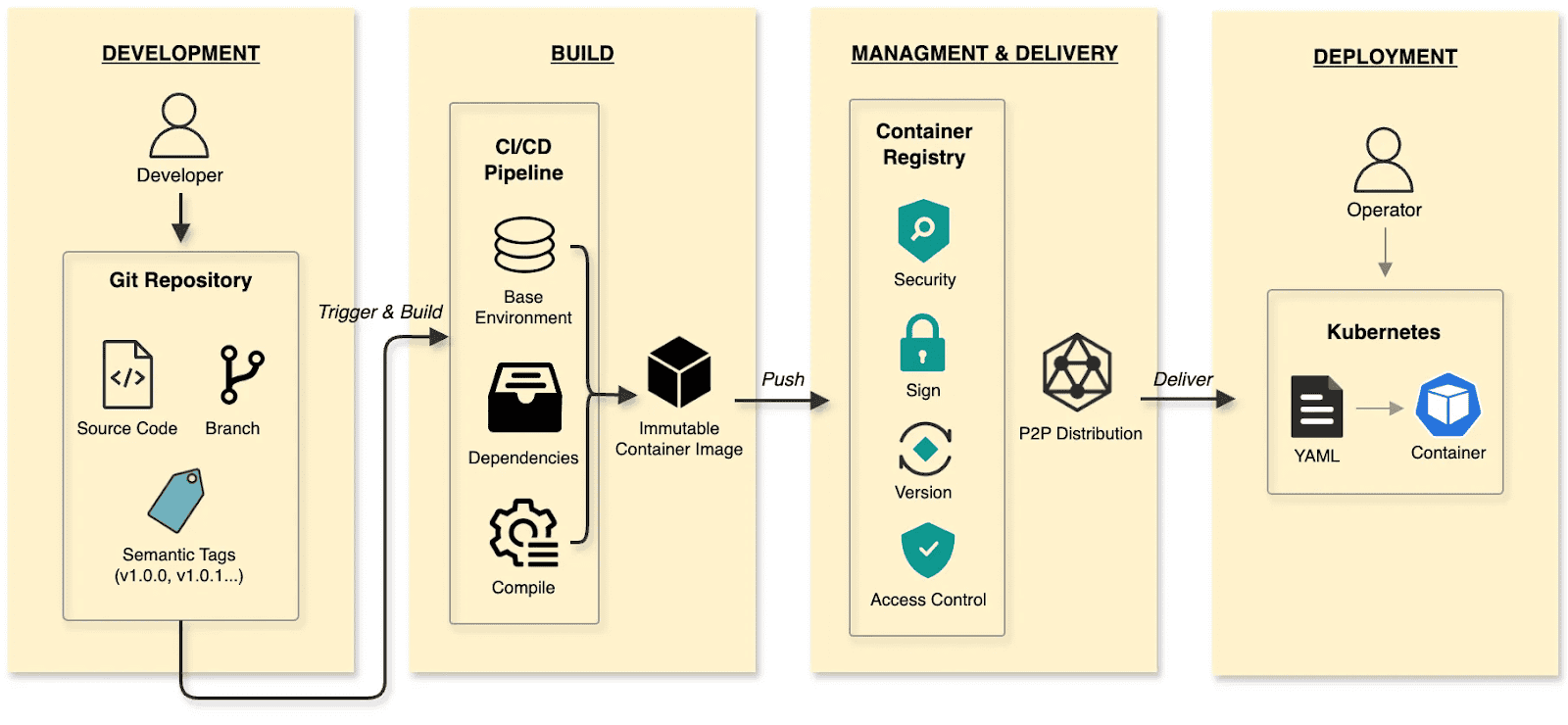
The software delivery:
- Develop: Developers commit code to a Git repository, manage code changes through branches, and define versions using tags at key milestones.
- Build: CI/CD pipelines compile and test, packaging the output into an immutable Container Image.
- Manage and deliver: Images are stored in a Container Registry. Supply chain security (scanning/signing), RBAC, and P2P distribution ensure safe delivery.
- Deploy: DevOps engineers use declarative Kubernetes YAML to define the desired state. The Container’s lifecycle is managed by Kubernetes.
The cloud native AI model delivery:
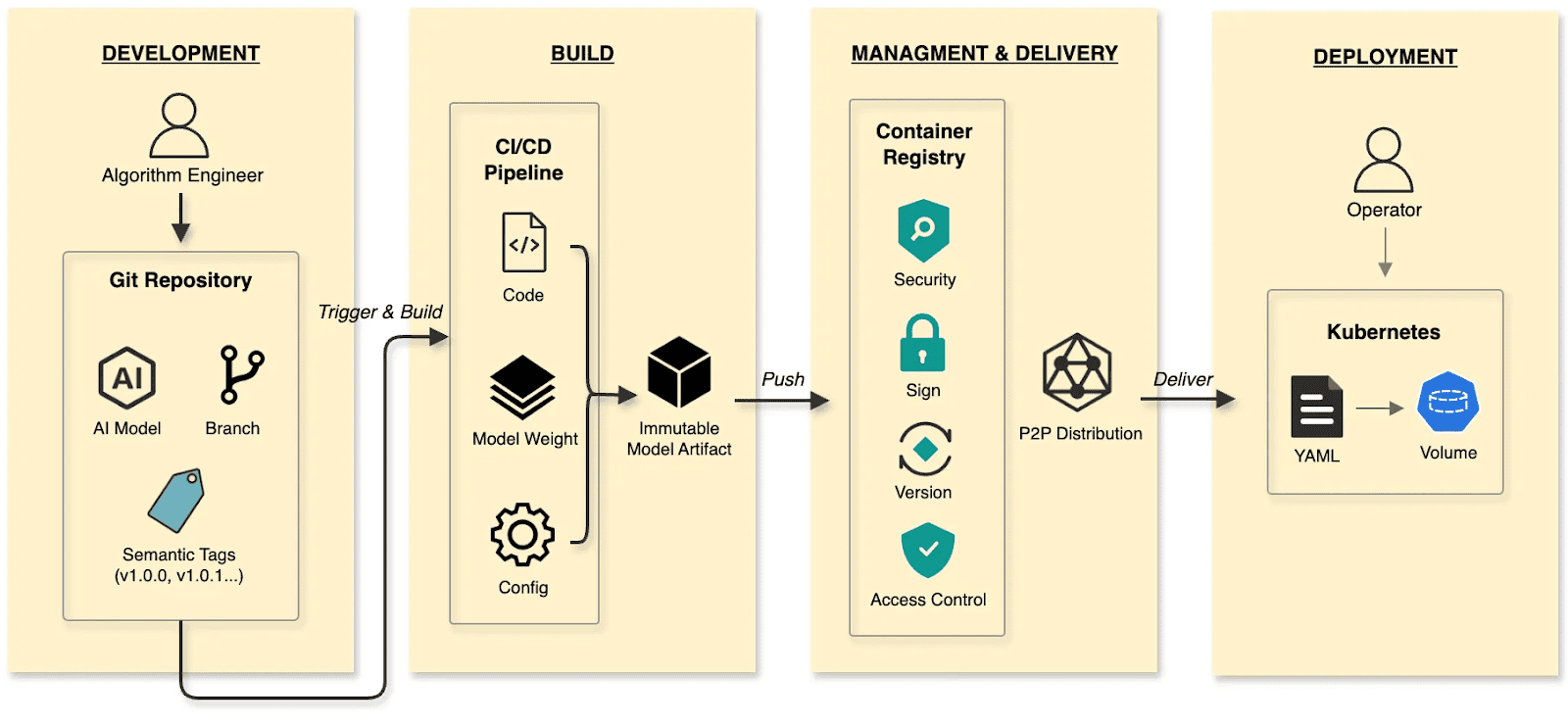
- Develop: Algorithm engineers push weights and configs to the Hugging Face Hub, treating it as the Git Repository.
- Build: CI/CD pipelines package weights, runtime configurations, and metadata into an immutable Model Artifact.
- Manage and deliver: The Model Artifact is managed by an Artifact Registry, reusing the existing container infrastructure and toolchain.
- Deploy: Engineers use Kubernetes OCI Volumes or a Model CSI Driver. Models are mounted into the inference Container as Volumes via declarative semantics, decoupling the AI model from the inference engine (vLLM, SGLang, etc.).
By applying software delivery paradigms and supply chain thinking to model lifecycle management, we constructed a granular, efficient system that resolves the challenges of managing and distributing AI models in production.
Walking the pipeline: A build story in four steps
Build
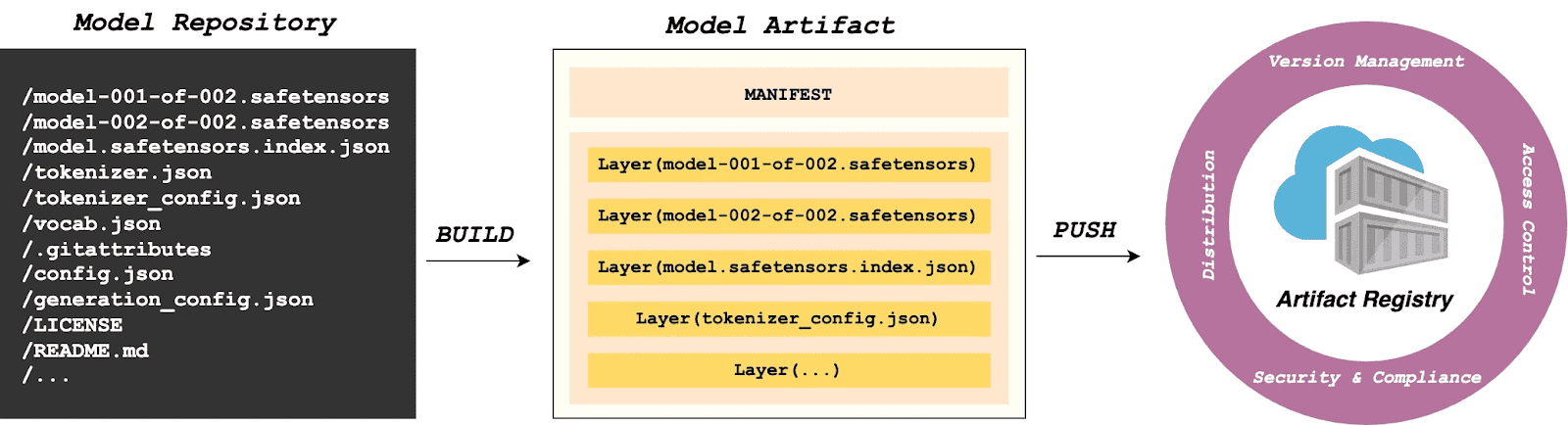
modctl is a CLI tool designed to package AI models into OCI artifacts. It standardizes versioning, storage, distribution and deployment, ensuring integration with the cloud-native ecosystem.
Step 1: Auto-generate Modelfile
Run the following in the model directory to generate a definition file.
$ modctl modelfile generate .Step 2: Customize Modelfile
You can also customize the content of the Modelfile.
# Model name (string), such as llama3-8b-instruct, gpt2-xl, qwen2-vl-72b-instruct, etc.
NAME qwen2.5-0.5b

# Model architecture (string), such as transformer, cnn, rnn, etc.
ARCH transformer

# Model family (string), such as llama3, gpt2, qwen2, etc.
FAMILY qwen2

# Model format (string), such as onnx, tensorflow, pytorch, etc.
FORMAT safetensors

# Specify model configuration file, support glob path pattern.
CONFIG config.json

# Specify model configuration file, support glob path pattern.
CONFIG generation_config.json

# Model weight, support glob path pattern.
MODEL *.safetensors

# Specify code, support glob path pattern.
CODE *.py
Step 3: Login to Artifact Registry (Harbor)
$ modctl login -u username -p password harbor.registry.comStep 4: Build OCI Artifact
$ modctl build -t harbor.registry.com/models/qwen2.5-0.5b:v1 -f Modelfile .A Model Manifest is generated after the build. Descriptive information such as ARCH, FAMILY, and FORMAT is stored in a file with the media type application/vnd.cncf.model.config.v1+json.
{
    "schemaVersion": 2,
    "mediaType": "application/vnd.oci.image.manifest.v1+json",
    "artifactType": "application/vnd.cncf.model.manifest.v1+json",
    "config": {
        "mediaType": "application/vnd.cncf.model.config.v1+json",
        "digest": "sha256:d5815835051dd97d800a03f641ed8162877920e734d3d705b698912602b8c763",
        "size": 301
    },
    "layers": [
        {
            "mediaType": "application/vnd.cncf.model.weight.v1.raw",
            "digest": "sha256:3f907c1a03bf20f20355fe449e18ff3f9de2e49570ffb536f1a32f20c7179808",
            "size": 4294967296
        },
        {
            "mediaType": "application/vnd.cncf.model.weight.v1.raw",
            "digest": "sha256:6d923539c5c208de77146335584252c0b1b81e35c122dd696fe6e04ed03d7411",
            "size": 5018536960
        },
        {
            "mediaType": "application/vnd.cncf.model.weight.config.v1.raw",
            "digest": "sha256:a5378e569c625f7643952fcab30c74f2a84ece52335c292e630f740ac4694146",
            "size": 106
        },
        {
            "mediaType": "application/vnd.cncf.model.weight.code.v1.raw",
            "digest": "sha256:15da0921e8d8f25871e95b8b1fac958fc9caf453bad6f48c881b3d76785b9f9d",
            "size": 394
        },
        {
            "mediaType": "application/vnd.cncf.model.doc.v1.raw",
            "digest": "sha256:5e236ec37438b02c01c83d134203a646cb354766ac294e533a308dd8caa3a11e",
            "size": 23040
        }
    ]
}
Step 5: Push
$ modctl push harbor.registry.com/models/qwen2.5-0.5b:v1Management
Current AI infrastructure workflows focus heavily on model distribution performance, often ignoring model management standards. Manual copying works for experiments, but in large-scale production, lacking unified versioning, metadata specs, and lifecycle management is poor practice. As the standard cloud-native Artifact Registry, Harbor is ideally suited for model storage, treating models as inference artifacts.
Harbor standardizes AI model management through:
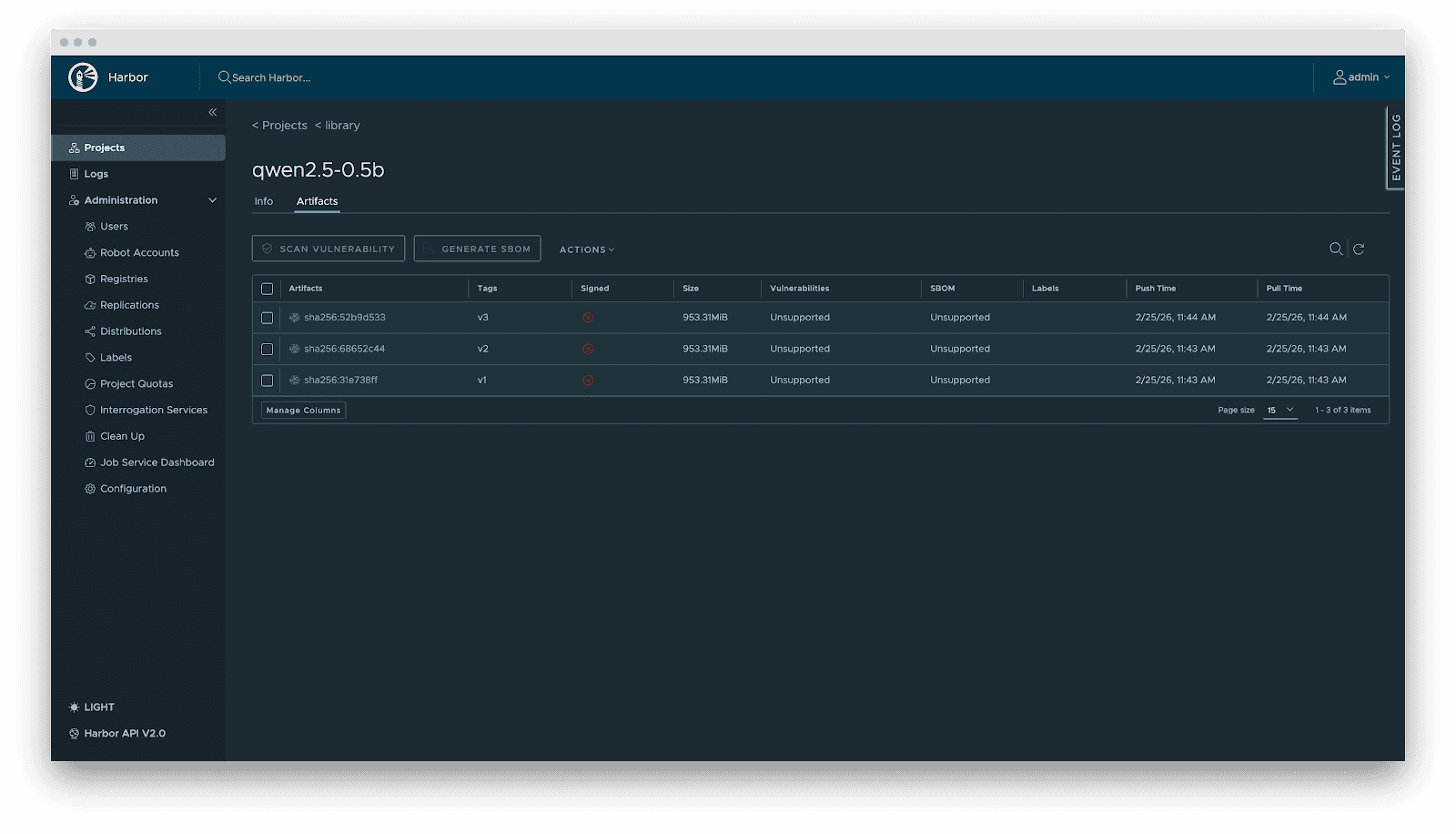
- Versioning: Models are OCI Artifacts with immutable Tags and Sha256 Digests. This guarantees deterministic inference environments. Meanwhile, it visually presents the model’s basic attributes, parameter configurations, display information, and the file list, which not only reduces the risks of unknown versions but also achieves full transparency of the model.
- RBAC: Fine-grained access control. Control who can PUSH (e.g., Algorithm Engineers), who can only PULL (e.g., Inference Services), and who has administrative privileges.
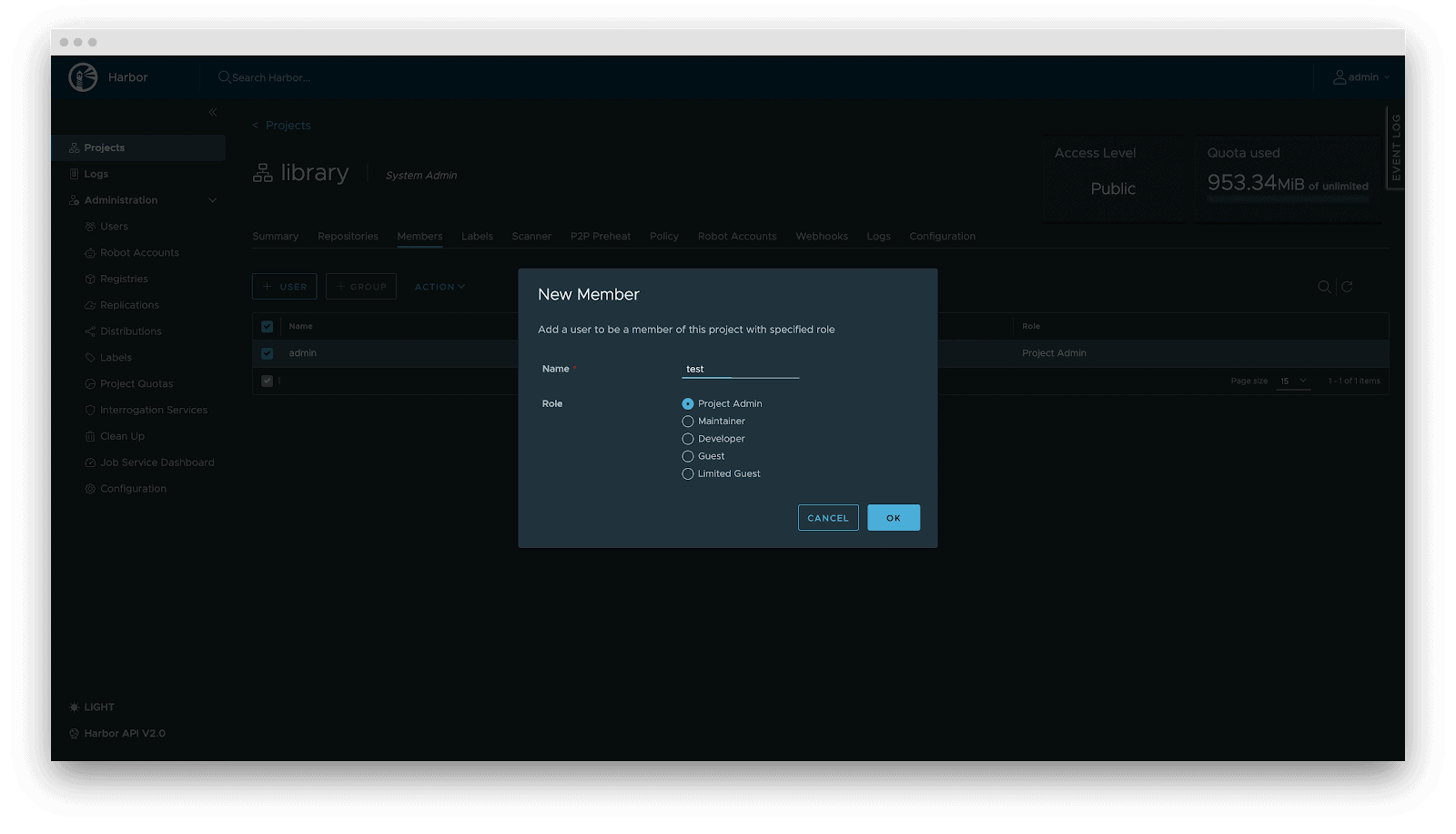
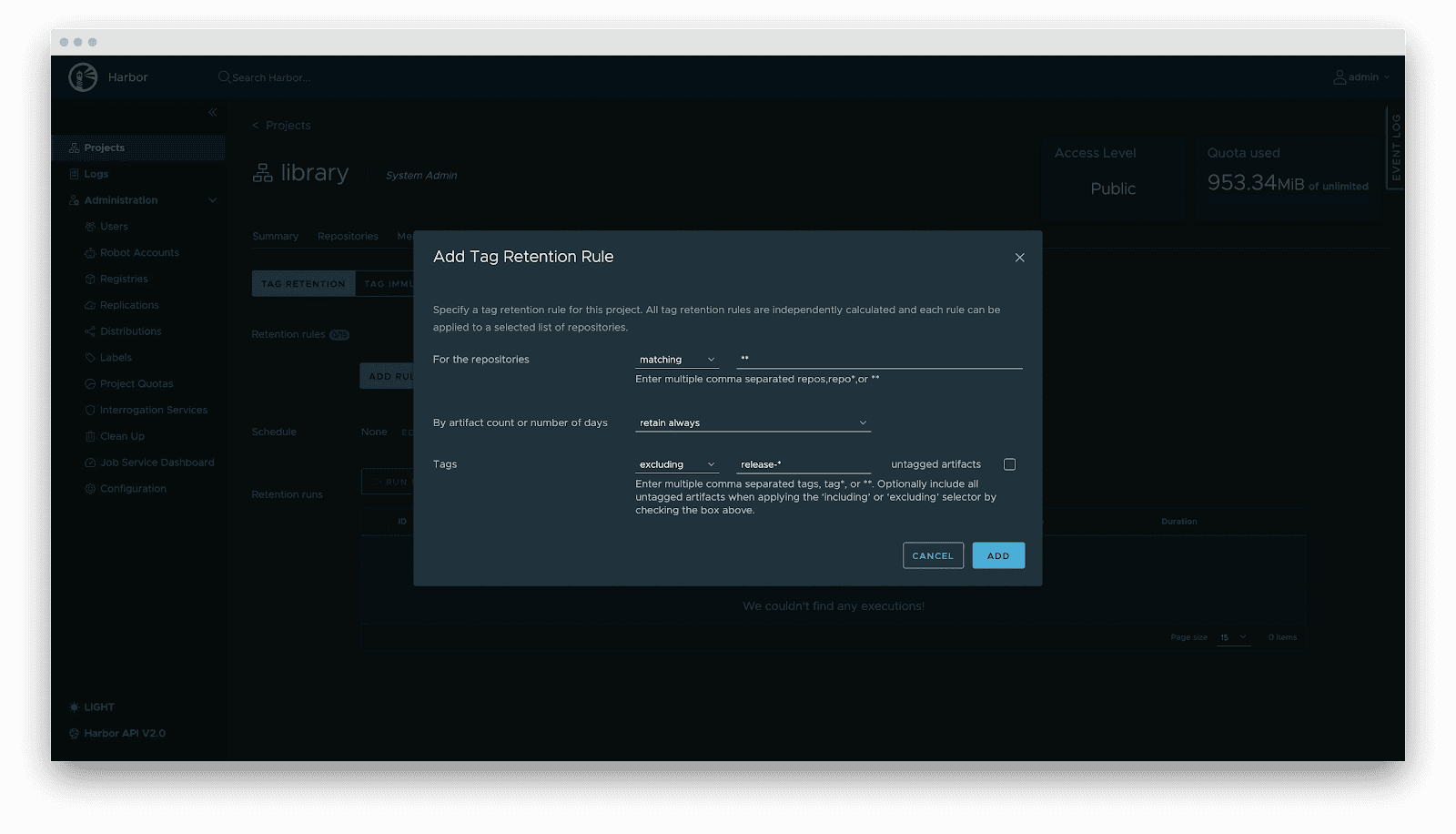
- Lifecycle management: Tag retention policies automatically purge non-release versions while locking active versions, balancing storage costs with stability.
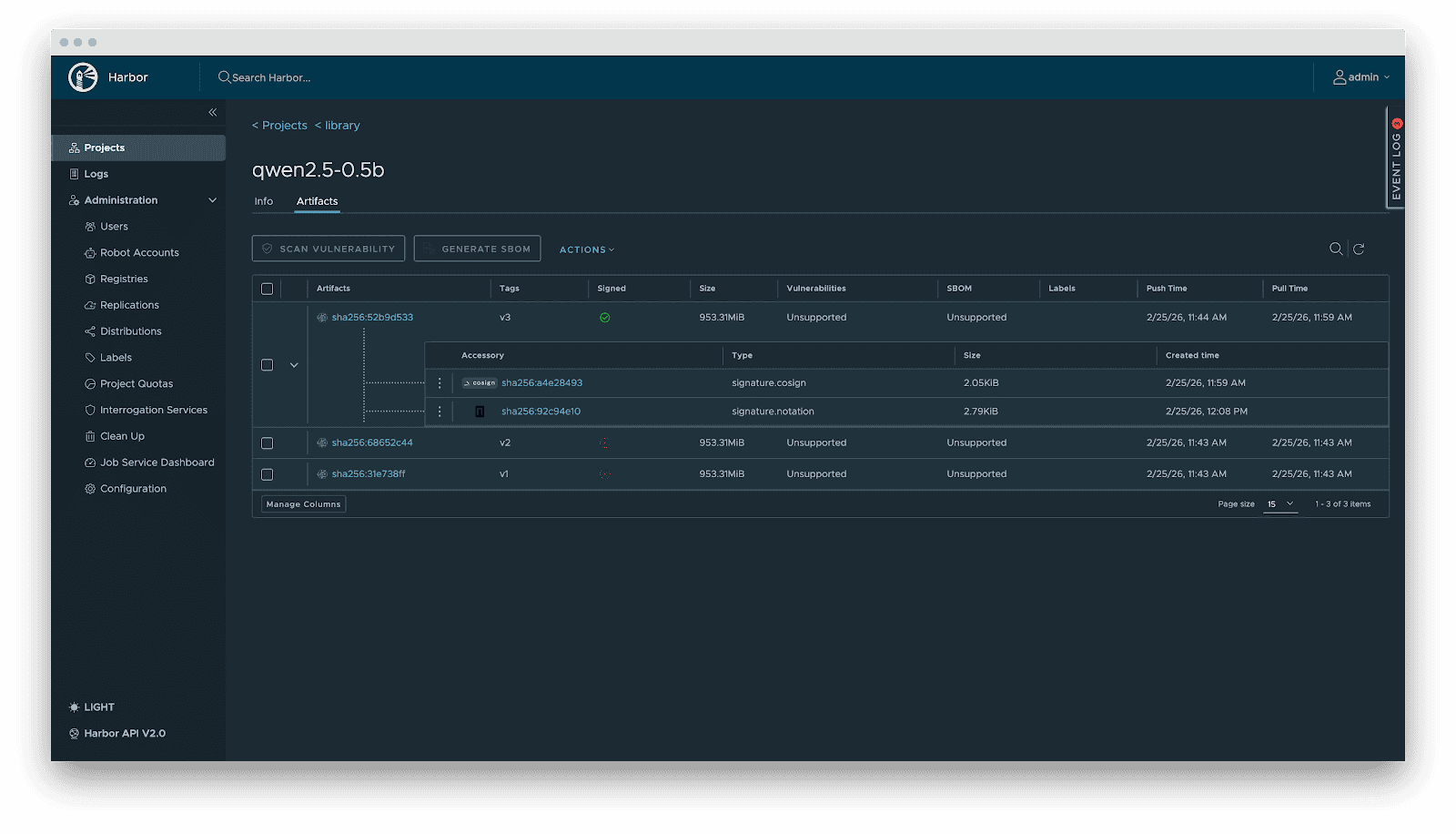
- Supply chain security: Integration with Cosign/Notation for signing. Harbor enforces signature verification before distribution, preventing model poisoning attacks.
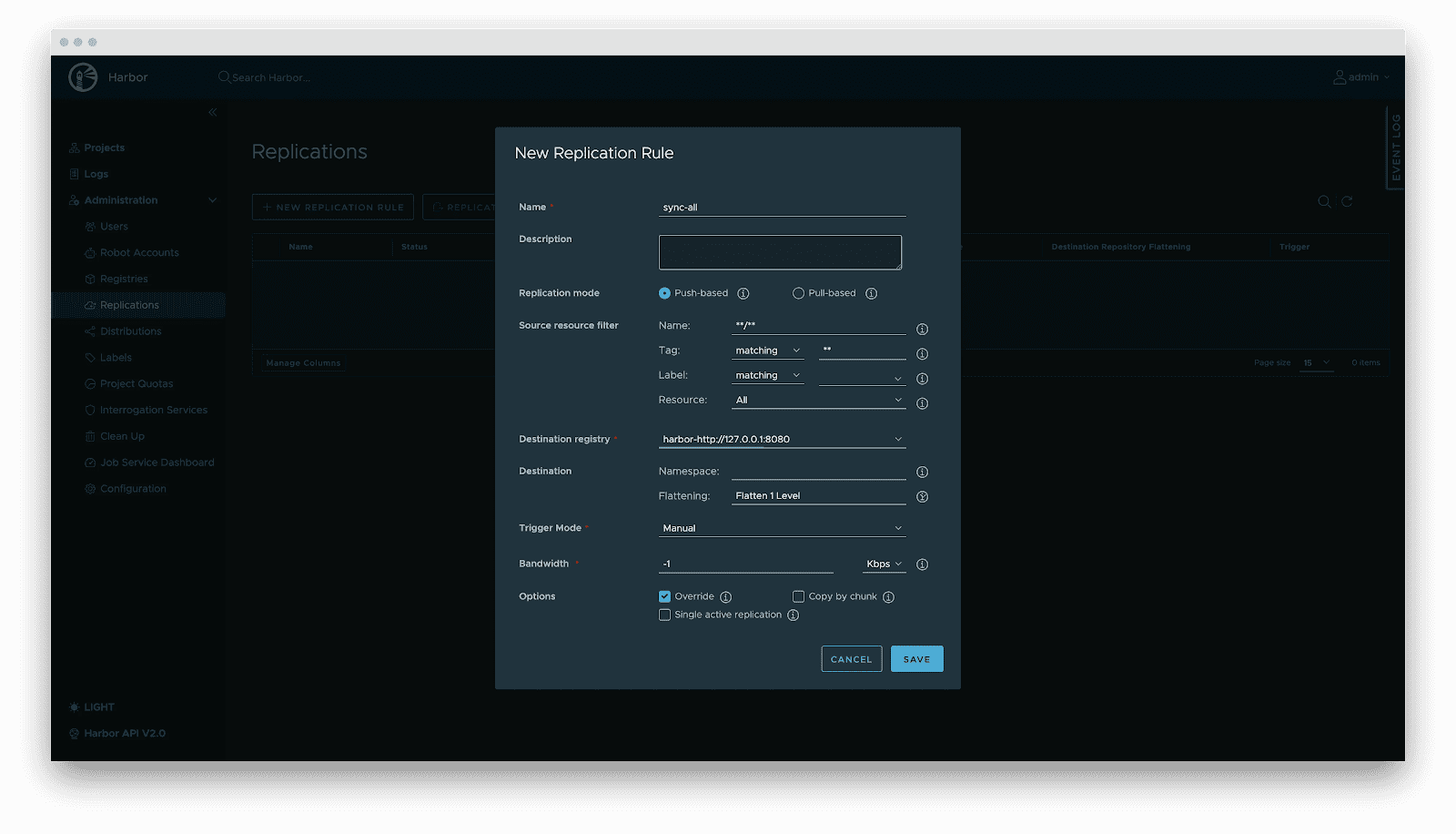
- Replication: Automated, incremental synchronization between central and edge registries or active-standby clusters.
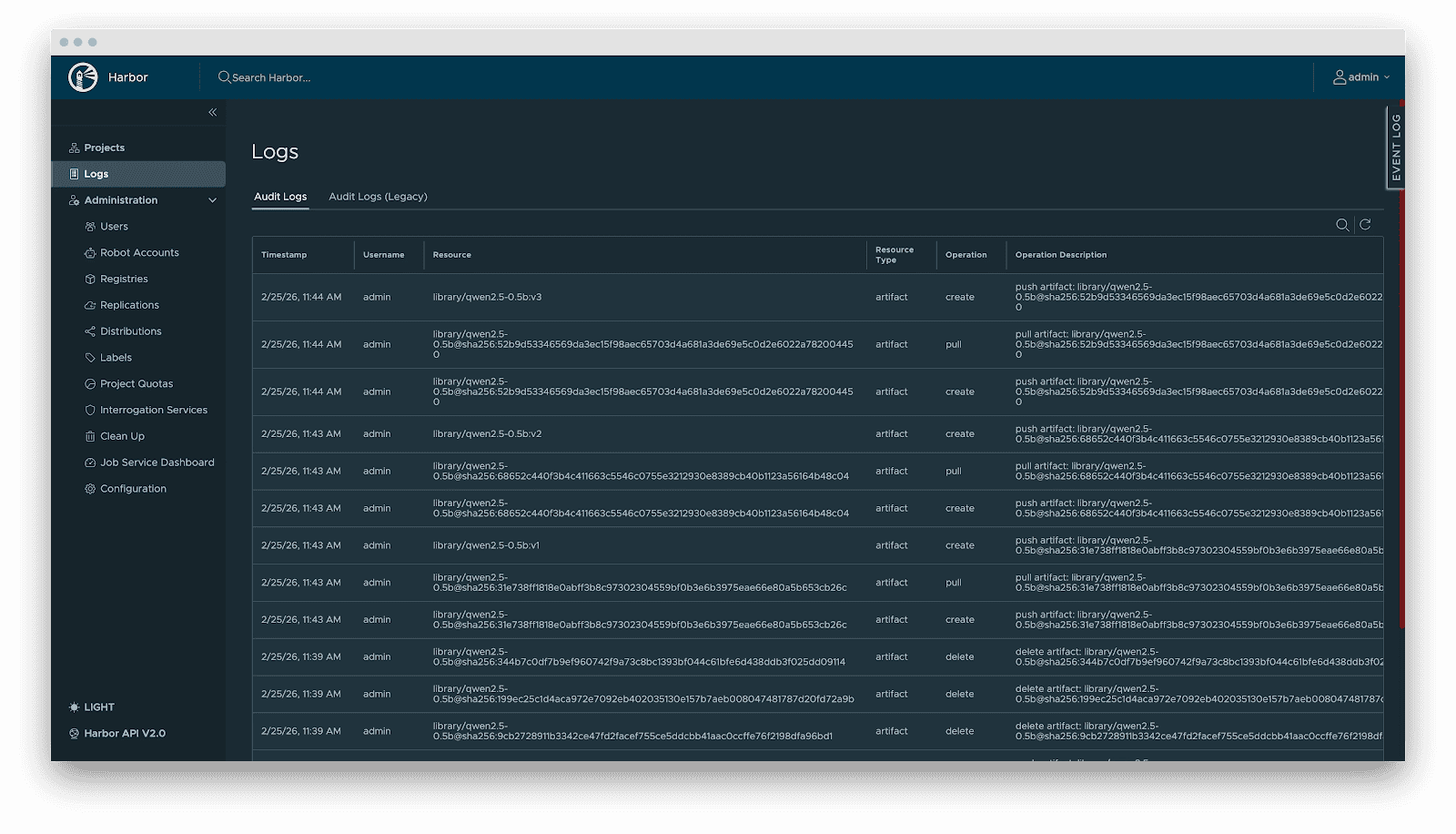
- Audit: Comprehensive logging of all artifact operations (pull/push/delete) for security compliance and traceability.
Delivery
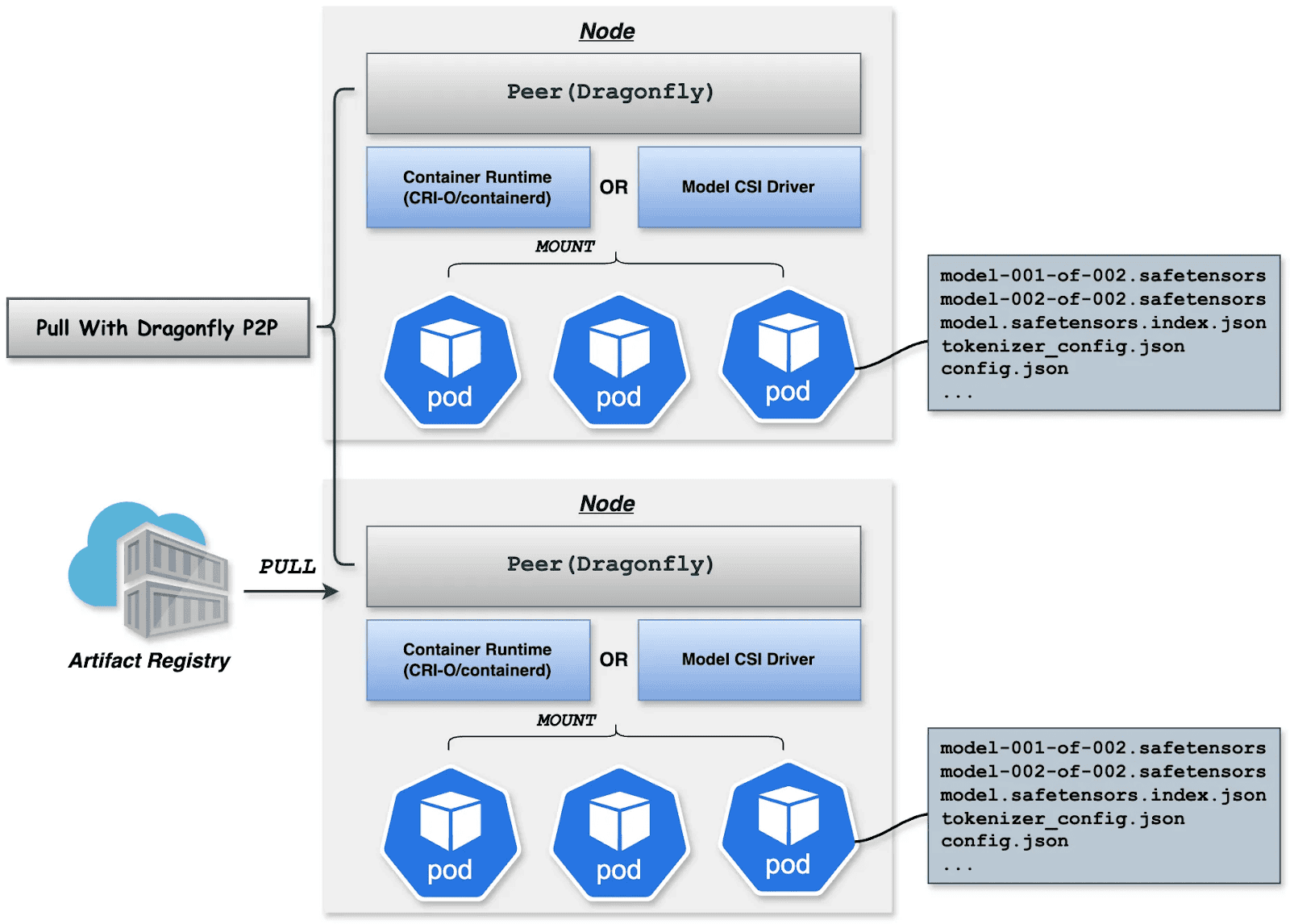
Downloading terabyte-sized model weights directly from the origin introduces bandwidth bottlenecks. We utilize Dragonfly for P2P-based distribution, integrated with Harbor for preheating.
Dragonfly P2P-based distribution
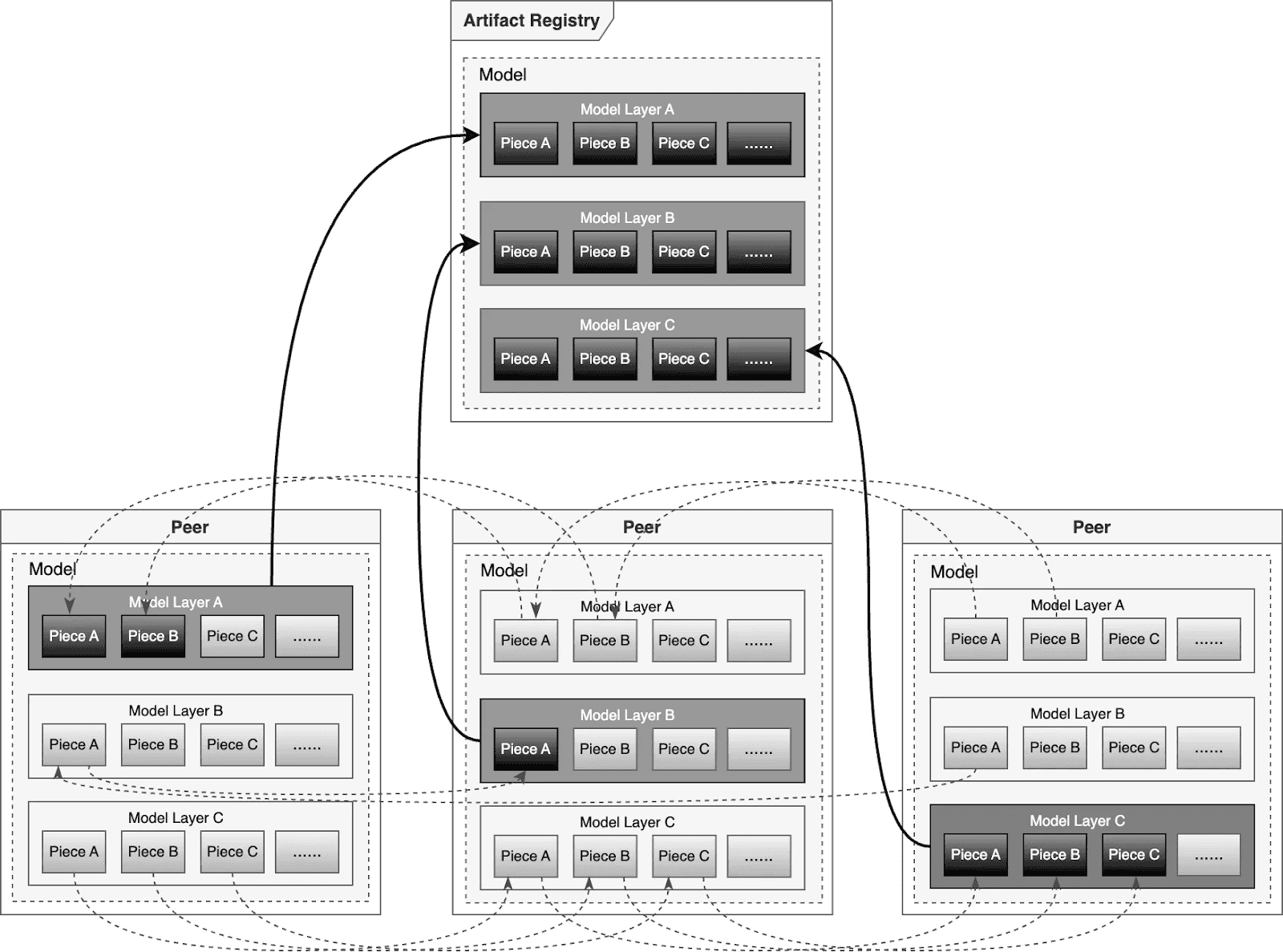
For large-scale distribution scenarios, Dragonfly has been deeply optimized based on P2P technology. Taking the example of 500 nodes downloading a 1TB model, the system distributes the initial download tasks of different layers across nodes to maximize downstream bandwidth utilization and avoid single-point congestion. Combined with a secondary bandwidth-aware scheduling algorithm, it dynamically adjusts download paths to eliminate network hotspots and long-tail latency. For individual model weight, Dragonfly splits individual model weights into pieces and fetches them concurrently from the origin. This enables streaming-based downloading, allowing users to share models without waiting for the complete file. This solution has been proven in high-performance AI clusters, utilizing 70%–80% of each node’s bandwidth and improving model deployment efficiency.
Preheating
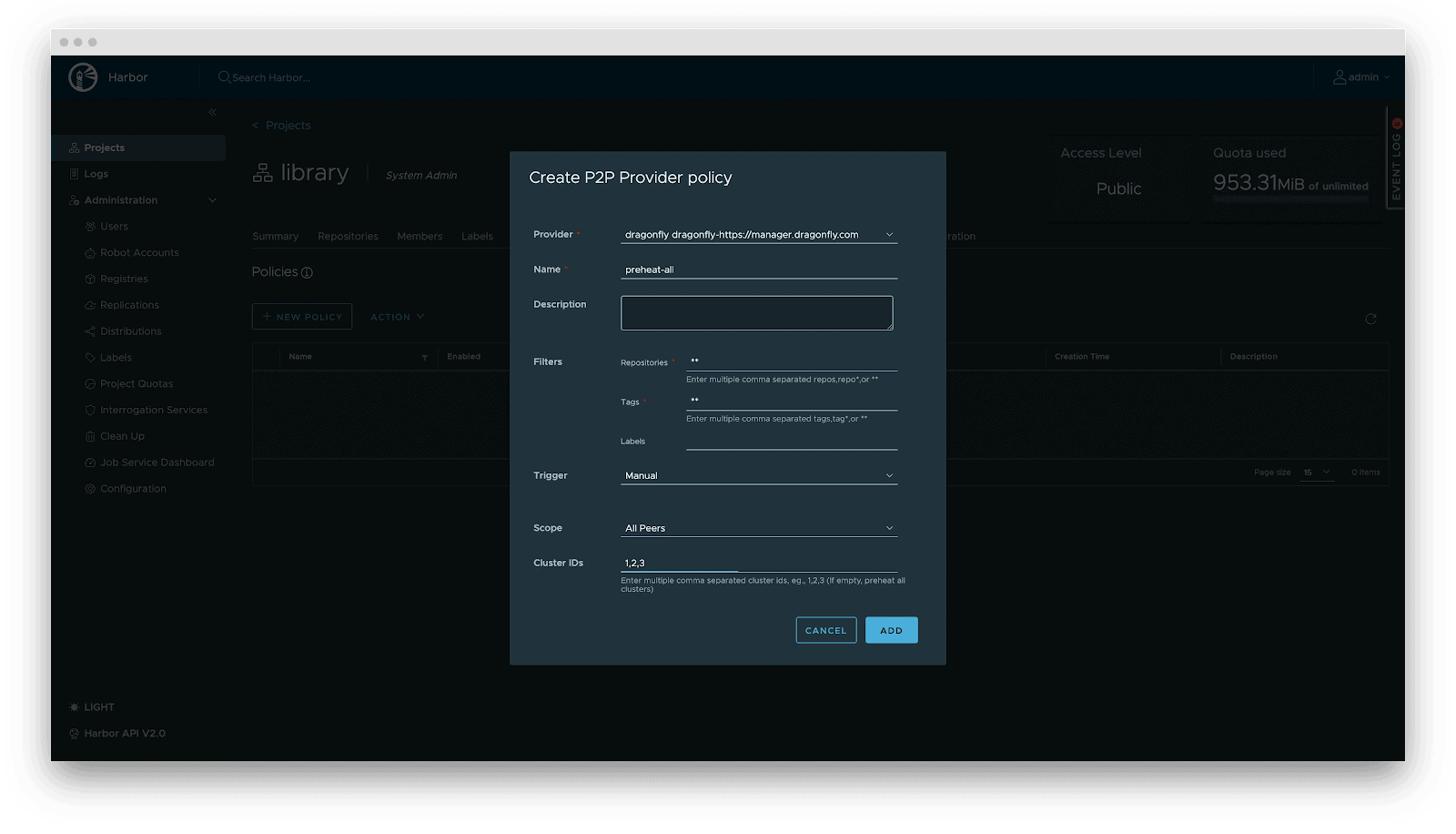
For latency-sensitive inference services, Harbor triggers Dragonfly to distribute and cache data on target nodes before service scaling. When the instance starts, the model loads from the local disk, achieving zero network latency.
Deployment
Deployment focuses on decoupling the Model (Data) from the Inference Engine (Compute). By leveraging Kubernetes declarative primitives, the Engine runs as a Container, while the Model is mounted as a Volume. This native approach not only enables multiple Pods on the same node to share and reuse the model, saving disk space, but also leverages the preheating and P2P capabilities of Harbor & Dragonfly to eliminate the latency of pulling large model weights, significantly improving startup speed.
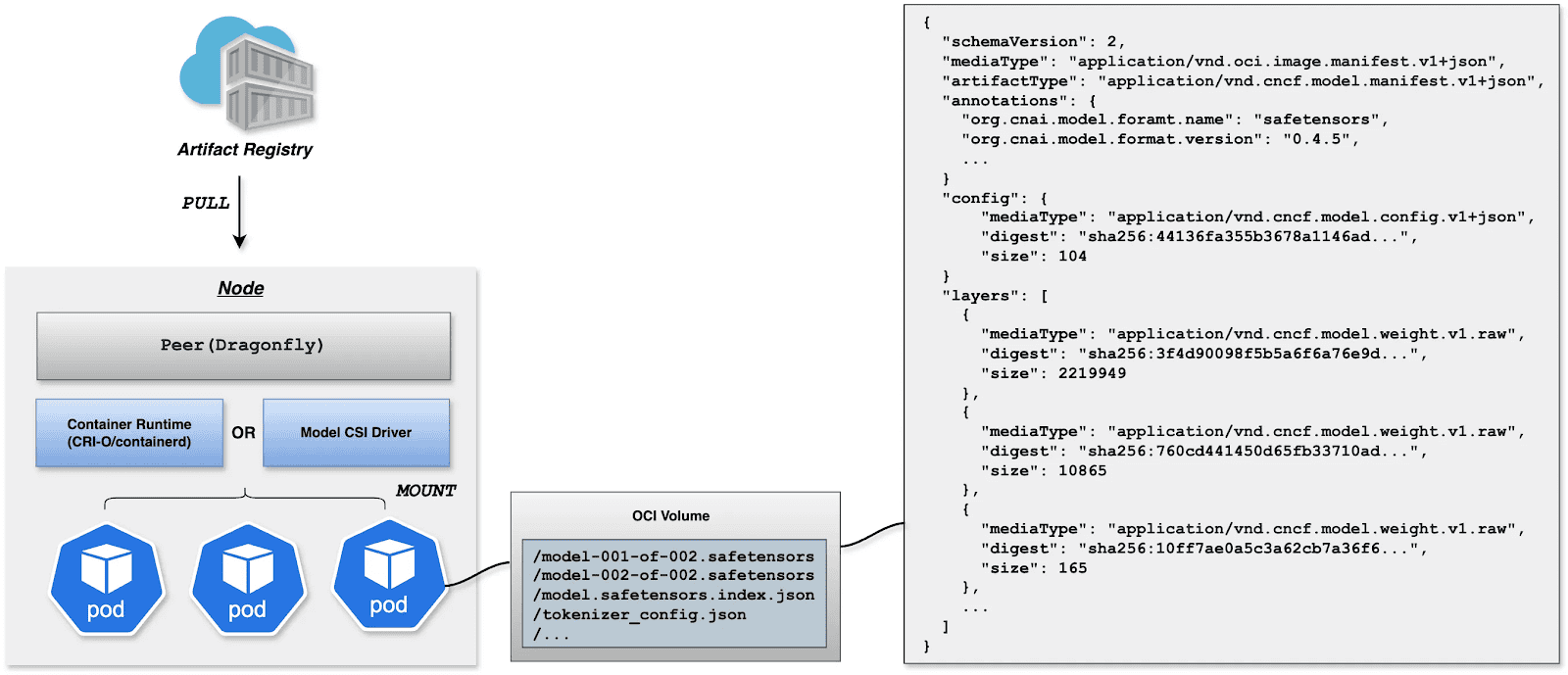
OCI Volumes (Kubernetes 1.31+)
Native support for mounting OCI artifacts as volumes via CRI-O/containerd. This feature was introduced as alpha in Kubernetes 1.31 (requires enabling the ImageVolume feature gate) and promoted to beta in Kubernetes 1.33 (enabled by default, no feature gate configuration needed). CRI-O specifically enhances this for LLMs by avoiding decompression overhead at mount time by storing layers uncompressed, resulting in superior performance when mounting large model files.
Step 1: Build YAML
apiVersion: v1
kind: Pod
metadata:
  name: vllm-cpu-inference
  labels:
    app: vllm
spec:
  containers:
  - name: vllm
    image: openeuler/vllm-cpu:latest
    command:
    - "python3"
    - "-m"
    - "vllm.entrypoints.openai.api_server"
    args:
    - "--model"
    - "/models"
    - "--dtype"
    - "float32"
    - "--host"
    - "0.0.0.0"
    - "--port"
    - "8000"
    - "--max-model-len"
    - "1024"
    - "--disable-log-requests"
    env:
    - name: VLLM_CPU_KVCACHE_SPACE
      value: "1"
    - name: VLLM_WORKER_MULTIPROC_METHOD
      value: "spawn"
    resources:
      requests:
        memory: "2Gi"
        cpu: "1"
      limits:
        memory: "16Gi"
        cpu: "8"
    volumeMounts:
    - name: model-volume
      mountPath: /models
      readOnly: true
    ports:
    - containerPort: 8000
      protocol: TCP
      name: http
    livenessProbe:
      httpGet:
        path: /health
        port: 8000
      initialDelaySeconds: 60
      periodSeconds: 10
      timeoutSeconds: 5
    readinessProbe:
      httpGet:
        path: /health
        port: 8000
      initialDelaySeconds: 30
      periodSeconds: 5
  volumes:
  - name: model-volume
    image:
      reference: ghcr.io/chlins/qwen2.5-0.5b:v1
      pullPolicy: IfNotPresent
---
apiVersion: v1
kind: Service
metadata:
  name: vllm-service
spec:
  selector:
    app: vllm
  ports:
  - port: 8000
    targetPort: 8000
    protocol: TCP
    name: http
  type: ClusterIP
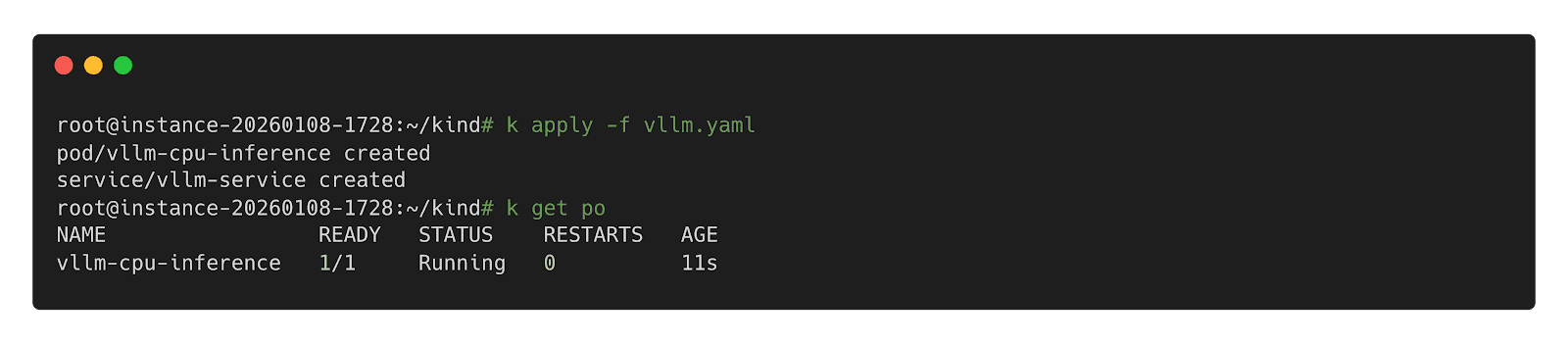
Step 2: Deploy inference Workload
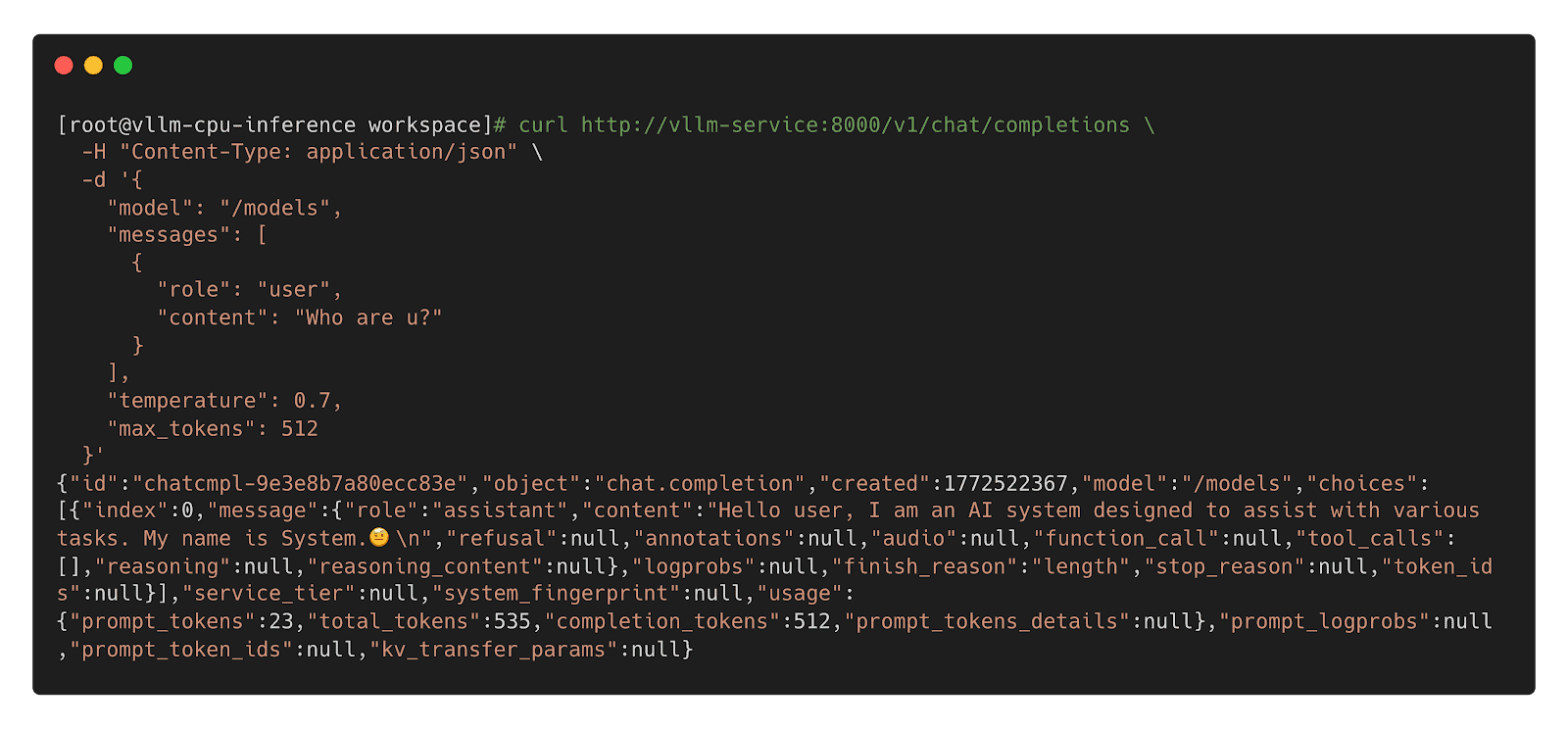
Step 3: Call Inference Workload
Model CSI Driver
For compatibility with Kubernetes 1.31 and older, we offer the Model CSI Driver as an interim solution to mount and deploy models as volumes. As OCI Volumes are slated for GA in Kubernetes 1.36, shifting to native OCI Volumes is recommended for the long term.
Step 1: Build YAML
apiVersion: v1
kind: Pod
metadata:
  name: vllm-cpu-inference
  labels:
    app: vllm
spec:
  containers:
  - name: vllm
    image: openeuler/vllm-cpu:latest
    command:
    - "python3"
    - "-m"
    - "vllm.entrypoints.openai.api_server"
    args:
    - "--model"
    - "/models"
    - "--dtype"
    - "float32"
    - "--host"
    - "0.0.0.0"
    - "--port"
    - "8000"
    - "--max-model-len"
    - "1024"
    - "--disable-log-requests"
    env:
    - name: VLLM_CPU_KVCACHE_SPACE
      value: "1"
    - name: VLLM_WORKER_MULTIPROC_METHOD
      value: "spawn"
    resources:
      requests:
        memory: "2Gi"
        cpu: "1"
      limits:
        memory: "16Gi"
        cpu: "8"
    volumeMounts:
    - name: model-volume
      mountPath: /models
      readOnly: true
    ports:
    - containerPort: 8000
      protocol: TCP
      name: http
    livenessProbe:
      httpGet:
        path: /health
        port: 8000
      initialDelaySeconds: 60
      periodSeconds: 10
      timeoutSeconds: 5
    readinessProbe:
      httpGet:
        path: /health
        port: 8000
      initialDelaySeconds: 30
      periodSeconds: 5
  volumes:
  - name: model-volume
    csi:
      driver: model.csi.modelpack.org
      volumeAttributes:
        model.csi.modelpack.org/reference: ghcr.io/chlins/qwen2.5-0.5b:v1
---
apiVersion: v1
kind: Service
metadata:
  name: vllm-service
spec:
  selector:
    app: vllm
  ports:
  - port: 8000
    targetPort: 8000
    protocol: TCP
    name: http
  type: ClusterIP
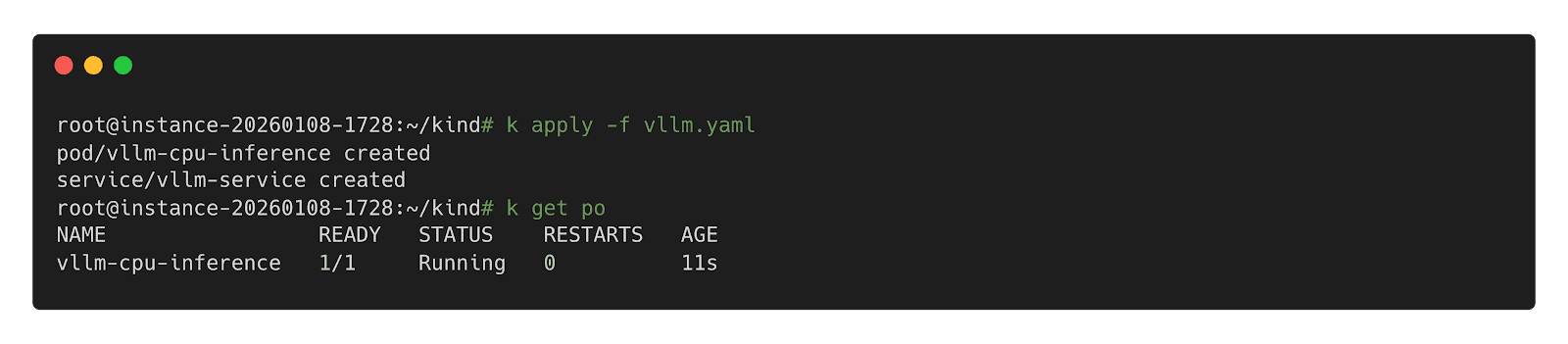
Step 2: Deploy Inference Workload
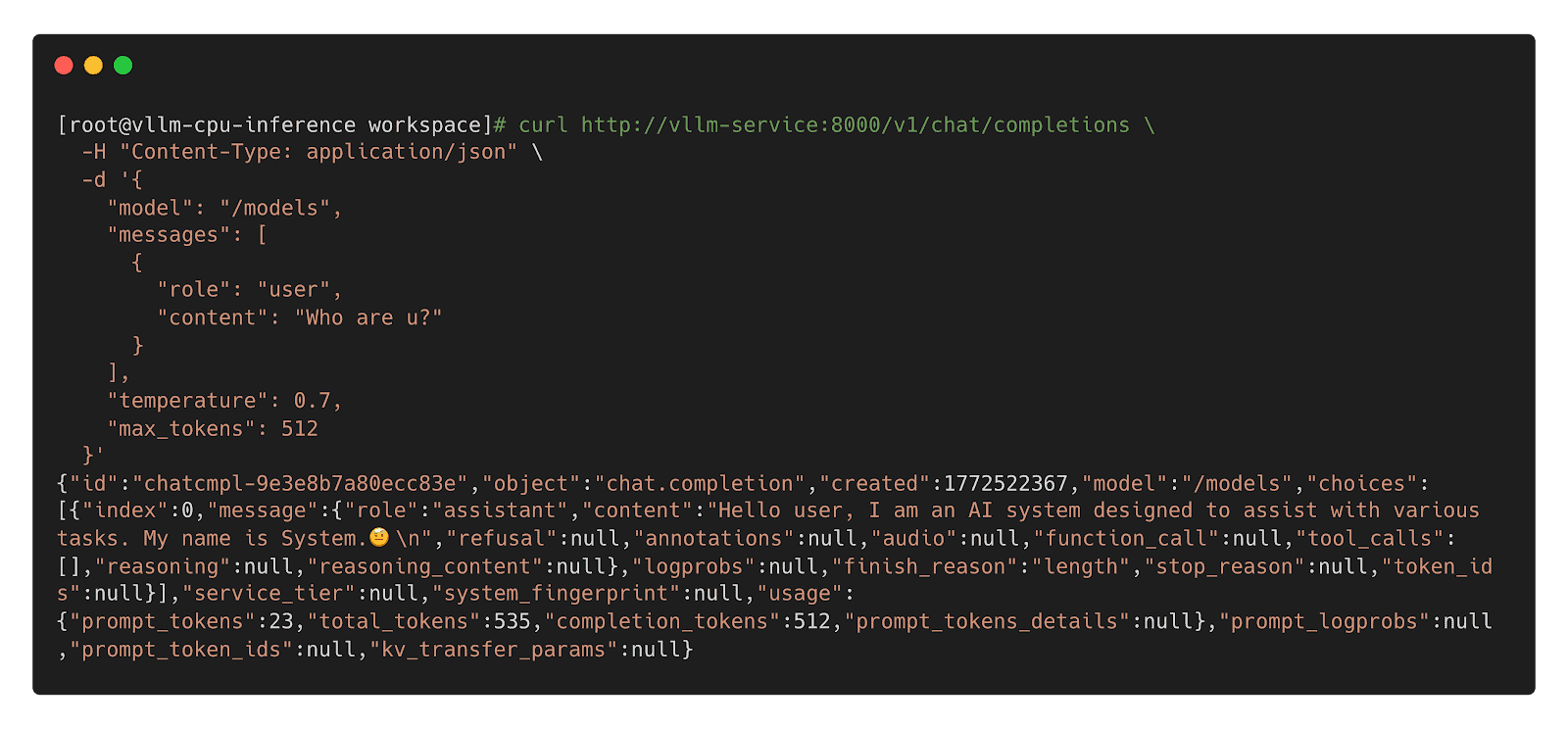
Step 3: Call Inference Workload
Future
- Enhanced Preheating: Allow models to be preheated to specified nodes and querying cache distribution across nodes for model-aware pod scheduling.
- Dragonfly RDMA Acceleration: Enable Dragonfly to utilize InfiniBand or RoCE to improve the speed of distribution.
- Lazy Loading: Implement on-demand downloading of model weights to reduce startup latency.
- containerd Optimization: Enhance the OCI Volumes implementation to reduce decompression overhead for large layers.
- Model Security Scanning: Introduce deep scanning capabilities specifically designed for model weights to detect embedded malicious payloads.
Collaborative Projects
- Kubernetes: https://github.com/kubernetes/kubernetes
- Harbor: https://github.com/goharbor/harbor
- Dragonfly: https://github.com/dragonflyoss/dragonfly
- CRI-O: https://github.com/cri-o/cri-o
- containerd: https://github.com/containerd/containerd
- modctl: https://github.com/modelpack/modctl
- Model CSI Driver: https://github.com/modelpack/model-csi-driver
- Model Spec: https://github.com/modelpack/model-spec
- ORAS: https://github.com/oras-project/oras
References
- Kubernetes – Read Only Volumes Based On OCI Artifacts: https://kubernetes.io/blog/2024/08/16/kubernetes-1-31-image-volume-source/
- Harbor – AI Model Processor: https://github.com/goharbor/community/blob/main/proposals/new/AI-model-processor.md
- Dragonfly – Load-Aware Scheduling Algorithm: https://d7y.io/docs/next/operations/deployment/applications/scheduler/#bandwidth-aware-scheduling-algorithm
- CRI-O – Add OCI Volume/Image Source Support: https://github.com/cri-o/cri-o/pull/8317
- containerd – Add OCI/Image Volume Source support: https://github.com/containerd/containerd/pull/10579