

A production internals guide verified against Kubernetes 1.35 GA
Companion repository: github.com/opscart/k8s-pod-restart-mechanics
The terminology problem
Engineers say “the pod restarted” when they mean four different things. Getting this wrong leads to flawed runbooks and bad on-call decisions.
| Term | Pod UID Changes? | Pod IP Changes? | Restart Count |
| Container restart (process restart inside the same pod) | No | No | +1 |
| Pod recreation (rolling update, drain) | Yes | Yes | Resets to 0 |
| In-place resize (1.35 GA) — CPU | No | No | 0 |
| In-place resize (1.35 GA) — memory (RestartContainer policy) | No | No | +1 |
The practical test: Did the pod UID change? If yes — that is recreation, not a container restart. Restart count resets to zero. If no — same pod object, container process restarted inside it.
The core insight: What kubelet actually watches
kubelet watches the pod spec — not ConfigMaps, not Secrets, not Istio CRDs. If the pod spec didn’t change, kubelet never fires. This single fact explains the majority of “why didn’t my config update?” investigations in production.
Mutating admission webhooks can change the pod spec at creation time, but never after admission — they cannot trigger container restarts post-creation.
Decision matrix
| Change | Container Restart? | Pod Recreated? | Automatic? |
| Container image | Yes | Yes | Yes — Deployment controller |
| Env var (any source) | Yes | No | Manual rollout |
| ConfigMap — volume mount | App decides | No | Partial — app must watch inotify |
| ConfigMap — envFrom | Yes | No | Manual rollout |
| Secret — volume mount | App decides | No | Partial — app must watch inotify |
| Secret — envFrom | Yes | No | Manual rollout |
| Projected ServiceAccount token | Never | No | Yes — kubelet auto-rotates |
| CPU resize (K8s 1.35+) | Never | No | Manual patch |
| Memory resize (K8s 1.35+) | Per resizePolicy | No | Manual patch |
| Istio VirtualService / DestinationRule | Never | No | Yes — xDS push |
| NetworkPolicy | Never | No | Yes — CNI agent |
| Service ports | Never | No | Yes — kube-proxy |
| RBAC | Never | No | Yes — API server |
| Node drain / eviction | Yes | Yes | Yes — automatic |
The flowchart below translates the same matrix into a decision path you can walk at 2am during an incident.
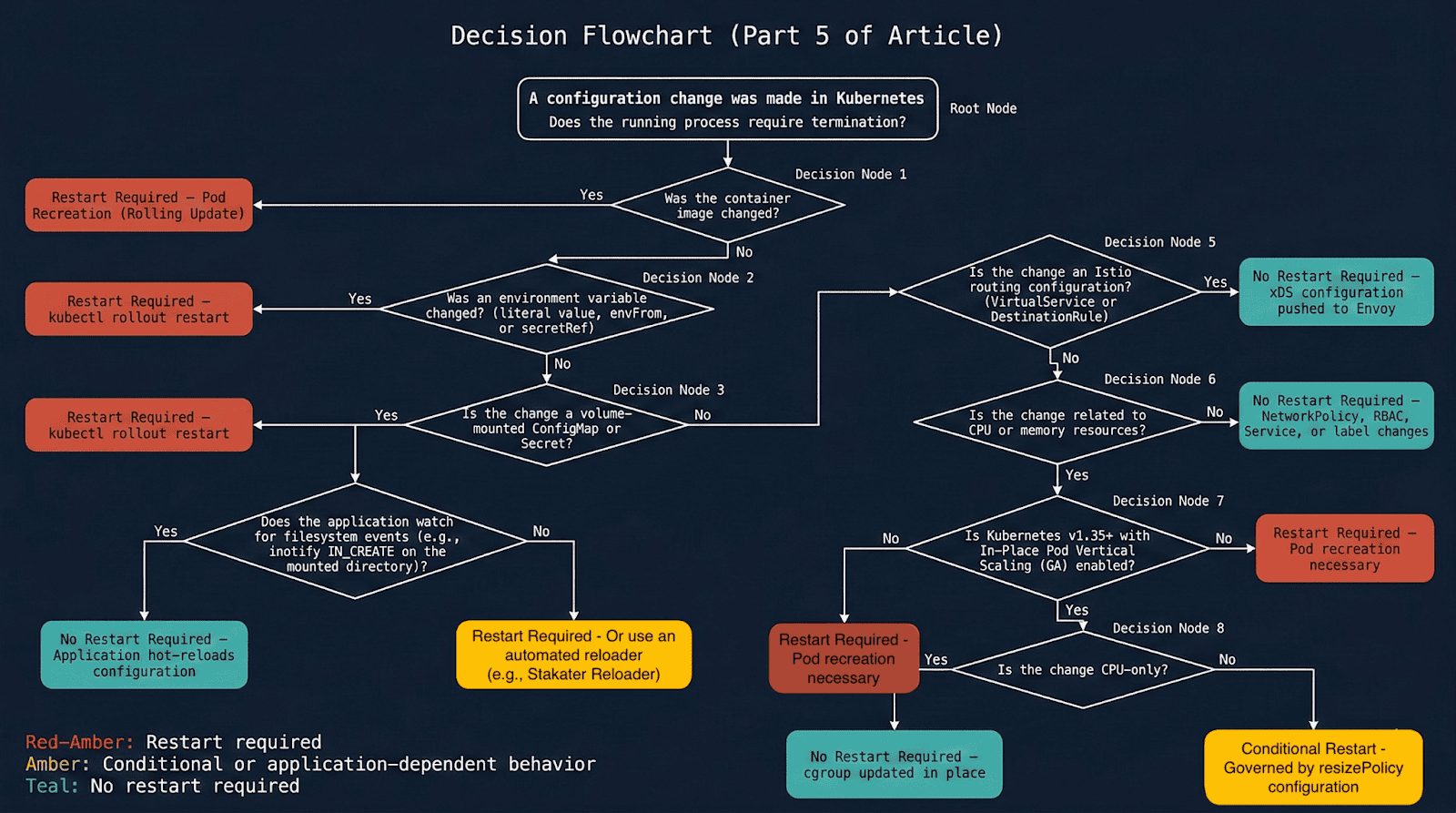
Diagram 1: Complete decision flowchart — does this change require a pod restart?
Scenario 1: ConfigMap — Why the same change has two behaviors
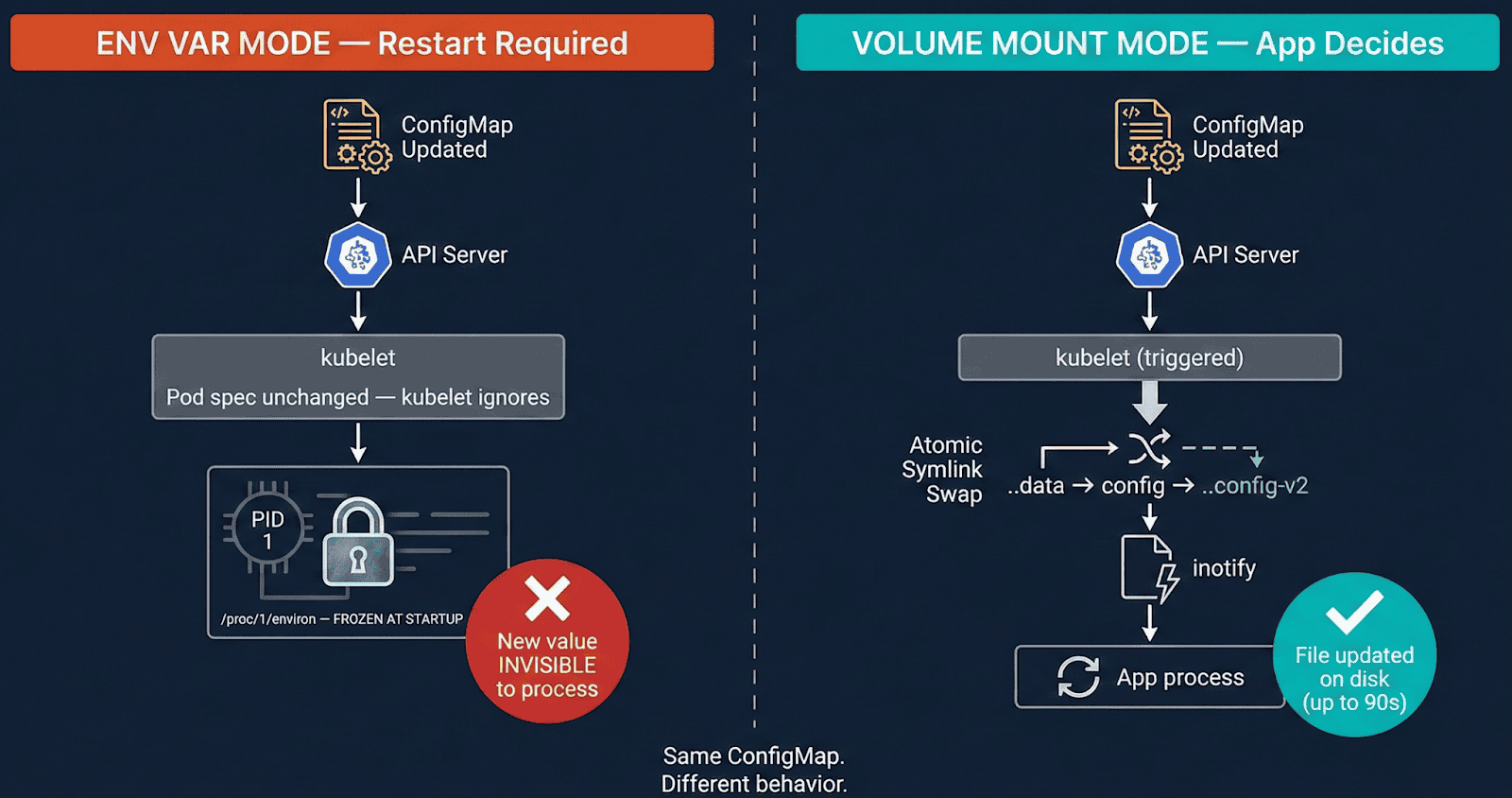
[Diagram 1: ConfigMap env var vs volume mount — env var pod frozen, volume pod auto-synced via kubelet symlink swap]
Env var mode (envFrom / valueFrom): The kernel copies env vars into /proc/<pid>/environ at execve(). That memory is owned by the process — no external system can modify it. Update the ConfigMap and kubelet sees no pod spec change, does nothing. The process keeps old values indefinitely.
Volume mount mode: kubelet syncs via an atomic symlink swap, not a file write:
/etc/config/
├── ..2025_12_19_11_30_00/   ← NEW data dir (kubelet creates this)
│   └── APP_COLOR            ← "red"
├── ..data ─────────────────▶ ..2025_12_19_11_30_00/  ← symlink SWAPPED atomically
└── APP_COLOR ──────────────▶ ..data/APP_COLOR
The symlink swap generates IN_CREATE on ..data — NOT IN_MODIFY on the file. Applications watching IN_MODIFY on an open file descriptor miss this entirely. This is why nginx does not auto-reload on ConfigMap changes without explicit inotify handling.
Lab Evidence (01-configmap/ in companion repo)
ConfigMap updated: APP_COLOR blue → red


Pod A (env var):      APP_COLOR=blue  ← frozen, restart count: 0
Pod B (volume mount): APP_COLOR=red   ← auto-synced, restart count: 0
Correct inotify pattern — watch the directory, not the file
watcher.Add(filepath.Dir(configPath))  // watches /etc/config/ — catches IN_CREATE
// watcher.Add(configPath)             // misses symlink swap entirely


for event := range watcher.Events {
    if event.Op&fsnotify.Create == fsnotify.Create {
        reloadConfig()
    }
}
Scenario 2: Image updates — Recreation vs container restart vs CrashLoop
These three scenarios look similar but are fundamentally different:
Successful image update — pod is recreated
BEFORE: Pod UID aaa-bbb, IP 10.244.1.5, nginx:1.25, restarts: 0
AFTER:  Pod UID xxx-yyy, IP 10.244.1.6, nginx:1.27, restarts: 0
                ↑ UID changed — RECREATION, not container restart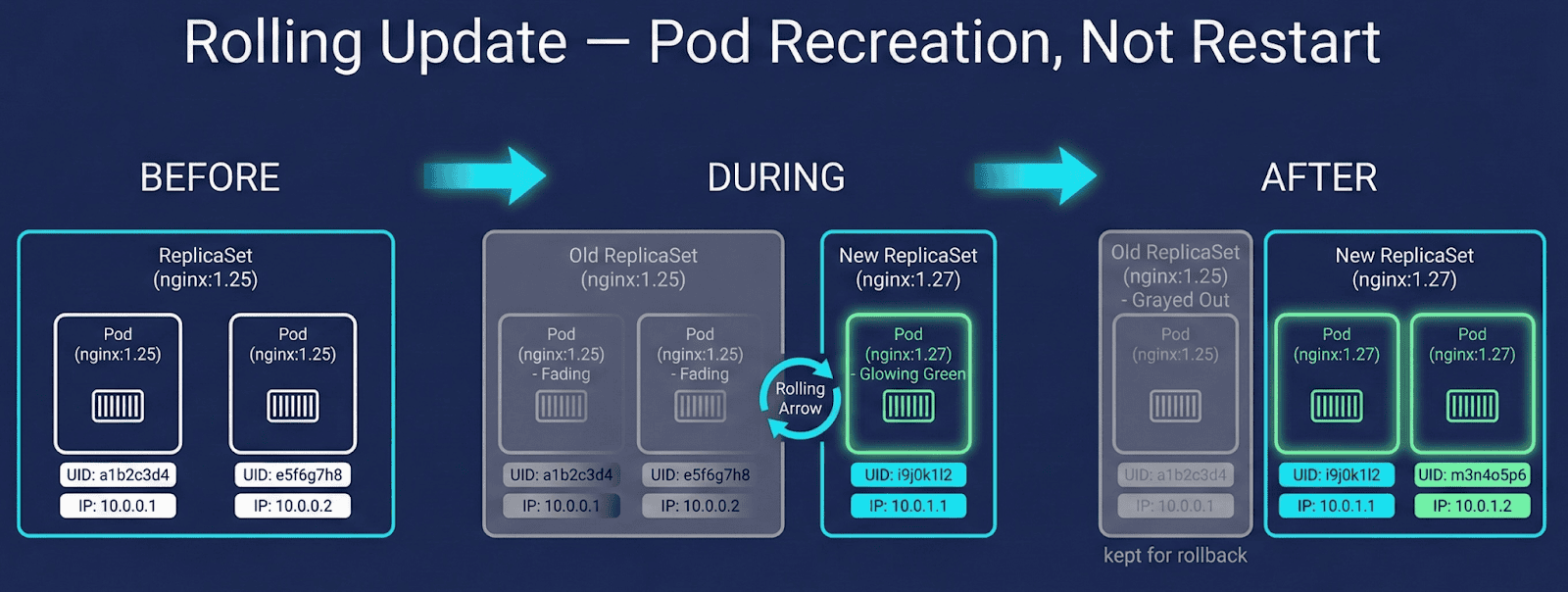
Diagram 3: Rolling update flow showing new ReplicaSet creation, pod recreation, and old RS retained for rollback.
ImagePullBackOff — old pod stays protected
Old pod: Running           ← Kubernetes keeps it alive
New pod: ImagePullBackOff  ← stuck, old pod never killed until new one is healthy
CrashLoopBackOff — same pod, restart count climbs
Pod UID:       aaa-bbb  ← UNCHANGED
Restart count: 0 → 1 → 2 → 3  ← same pod object, container crashing
Diagnostic rule: Climbing restart count with unchanged UID = crash loop. Zero restart count with new UID = rolling update.
StatefulSet note: StatefulSet pods are also recreated on image change, but ordinal identity (pod-0, pod-1) and PVC bindings are preserved. Container restart semantics are identical to Deployments — identity persistence does not imply in-place container restart.
Scenario 3: In-place resource resize (K8s 1.35 GA)
K8s 1.35 made in-place pod resize generally available (kubernetes.io/blog/2025/12/19/kubernetes-v1-35-in-place-pod-resize-ga). Both CPU and memory can be resized without pod recreation — UID and IP never change. In-place resize availability depends on CRI and node OS support; verified on containerd 1.7+ with Linux cgroups v2.
What happens to the container depends on resizePolicy, which you define explicitly:
resizePolicy:
- resourceName: cpu
  restartPolicy: NotRequired      # cgroup quota updated, process untouched
- resourceName: memory
  restartPolicy: RestartContainer # container restarts inside same pod
Lab Evidence (05-resource-resize/ — requires K8s 1.35+)
CPU resize 200m → 500m (NotRequired):
  UID: d7c99204  IP: 10.244.0.7  Restarts: 0  ← all unchanged


Memory resize 256Mi → 512Mi (RestartContainer):
  UID: d7c99204  IP: 10.244.0.7  Restarts: 1
       ↑ same pod      ↑ same IP    ↑ our policy choice, not K8s forcing it
Important: The default resizePolicy for memory is NotRequired. If you omit it, memory resize silently updates the cgroup without restarting the container — and your JVM heap stays at the old size. Always define resizePolicy explicitly for memory.
How to apply
kubectl patch pod my-pod -n my-namespace \
  --subresource resize \
  -p '{"spec":{"containers":[{"name":"app","resources":{
    "requests":{"cpu":"250m","memory":"128Mi"},
    "limits":{"cpu":"500m","memory":"256Mi"}
  }}]}}'
# Note: omit --type=merge — causes a validation error with --subresource resize
Scenario 4: Istio routing — Zero restarts via xDS
Istio VirtualService and DestinationRule changes never trigger container restarts. Istiod maintains a persistent bidirectional gRPC stream to each Envoy sidecar — routing updates are pushed in milliseconds, in-memory swap, no pod touched, no file written.
Lab Evidence (04-istio-routing/ in companion repo)
Four pods. Three routing changes:
  100% v1  →  80/20 canary  →  100% v2


Restart counts: BEFORE 0 0 0 0 / AFTER 0 0 0 0
Pod ages: unchanged throughout all three changes.
Scenario 5: Stakater reloader — Automating the manual step
When apps consume ConfigMaps via env vars, someone must run kubectl rollout restart after every update. Reloader automates this using Kubernetes watch events — detection is near-instant, not polling.
metadata:
  annotations:
    reloader.stakater.com/auto: "true"
Production gotcha: The default Helm install uses watchGlobally=false — Reloader only watches its own namespace. Annotated Deployments in other namespaces are silently ignored, no error thrown. Always install with watchGlobally=true.
helm install reloader stakater/reloader \
  --namespace reloader \
  --set reloader.watchGlobally=true
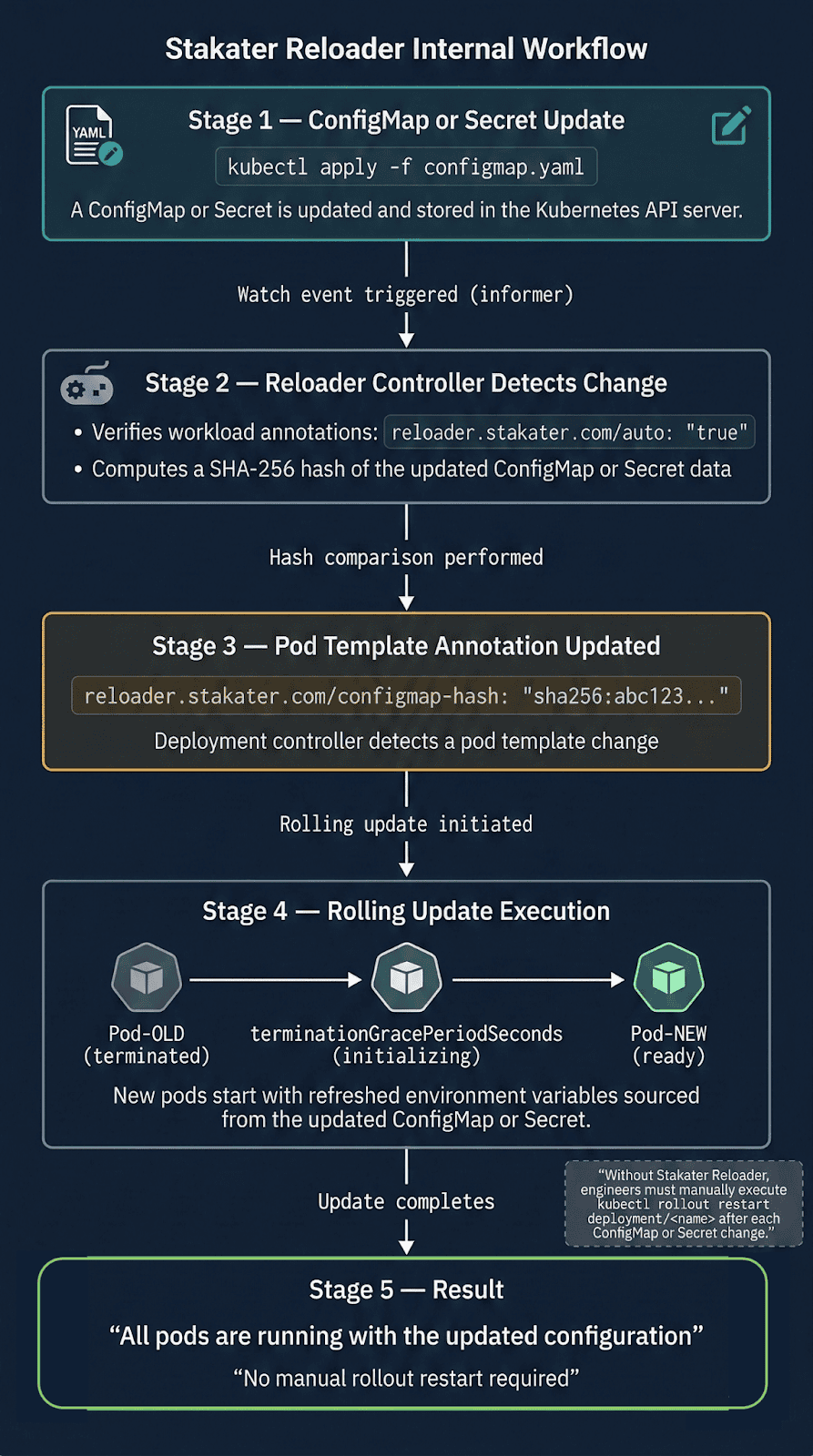
Lab Evidence (07-stakater-reloader/ in companion repo)
ConfigMap updated. No kubectl rollout restart run.


New pod APP_MESSAGE: "Hello from OpsCart v2 — auto reloaded!"
Rolling container restart triggered automatically.
When hot-reload goes wrong
Hot-reload is not always safer than a container restart. Two failure modes worth knowing:
Semantically invalid config accepted silently
The file updates, the inotify handler fires, no error is thrown — but the new config has a logic error. The pod passes health checks and runs broken for hours. A container restart with a bad config fails immediately and loudly. Hot-reload with bad config fails quietly and late.
Mitigation: Validate config before swapping atomically.
Envoy rejects xDS push silently
Istiod pushes a RouteConfiguration referencing a cluster not yet propagated. Envoy rejects it and continues with old routing rules. No pod event fires. Mitigation: Monitor pilot_xds_push_errors and use istioctl proxy-status.
Observability: Three commands every operator should know
# 1. Container restart or pod recreation? Check UID change
kubectl get pod <pod> -o custom-columns=\
  "NAME:.metadata.name,UID:.metadata.uid,IP:.status.podIP,RESTARTS:.status.containerStatuses[0].restartCount"


# 2. Events on the pod
kubectl describe pod <pod> | grep -A 20 "Events:"


# 3. In-place resize status
kubectl get pod <pod> -o jsonpath='{.status.resize}'
Conclusion
A container restart is disruptive but honest — failure modes are immediate and visible. Hot-reload optimizes for availability but shifts failures to be delayed and subtle. Both are valid strategies. The choice should be conscious.
The goal is not to automate restarts faster. It is to understand deeply enough that you trigger a container restart only when the process genuinely needs to die — and use every other mechanism when it does not.
Companion repository: github.com/opscart/k8s-pod-restart-mechanics
Author: Shamsher Khan — Senior DevOps Engineer, IEEE Senior Member. https://OpsCart.com
This article is adapted from an earlier version published on OpsCart.com. Republished here with permission.