

Imagine you are running a bunch of microservices, each living within its own boundary. What are some of the challenges that come into mind when operating them?
- Retries: Service-to-service calls are not always reliable. They can fail due to a number of reasons, ranging from timeouts to transient network issues, or downstream outages. In order to recover, it is common for applications to implement retry logic. Over time, this logic becomes tightly coupled with business code, and every developer is expected to configure retries correctly.
- Observability also presents a similar challenge. Each service must be instrumented with metrics, logs, and traces to understand request flow, latency, and failures. This instrumentation is often repetitive and easy to get wrong or overlook and when observability is inconsistent, debugging production issues becomes slow and frustrating.
This is where Distributed Application Runtime (Dapr) comes into picture. Dapr is a CNCF-hosted, open-source runtime that provides building blocks for distributed applications through a sidecar architecture. It helps abstract most of these constructs into a sidecar runtime so that you as developers can concentrate on business logic. Simply put, it is an open-source and event-driven runtime that simplifies some of the common problems developers face with building distributed systems and microservices.
Below is an example of a simple application interacting with the Dapr runtime to use several features, referred to as building blocks, such as workflows, pub/sub, conversations, and jobs. Along with the building blocks, Dapr also provides SDKs for most major programming languages, making it easy to integrate these capabilities into applications.
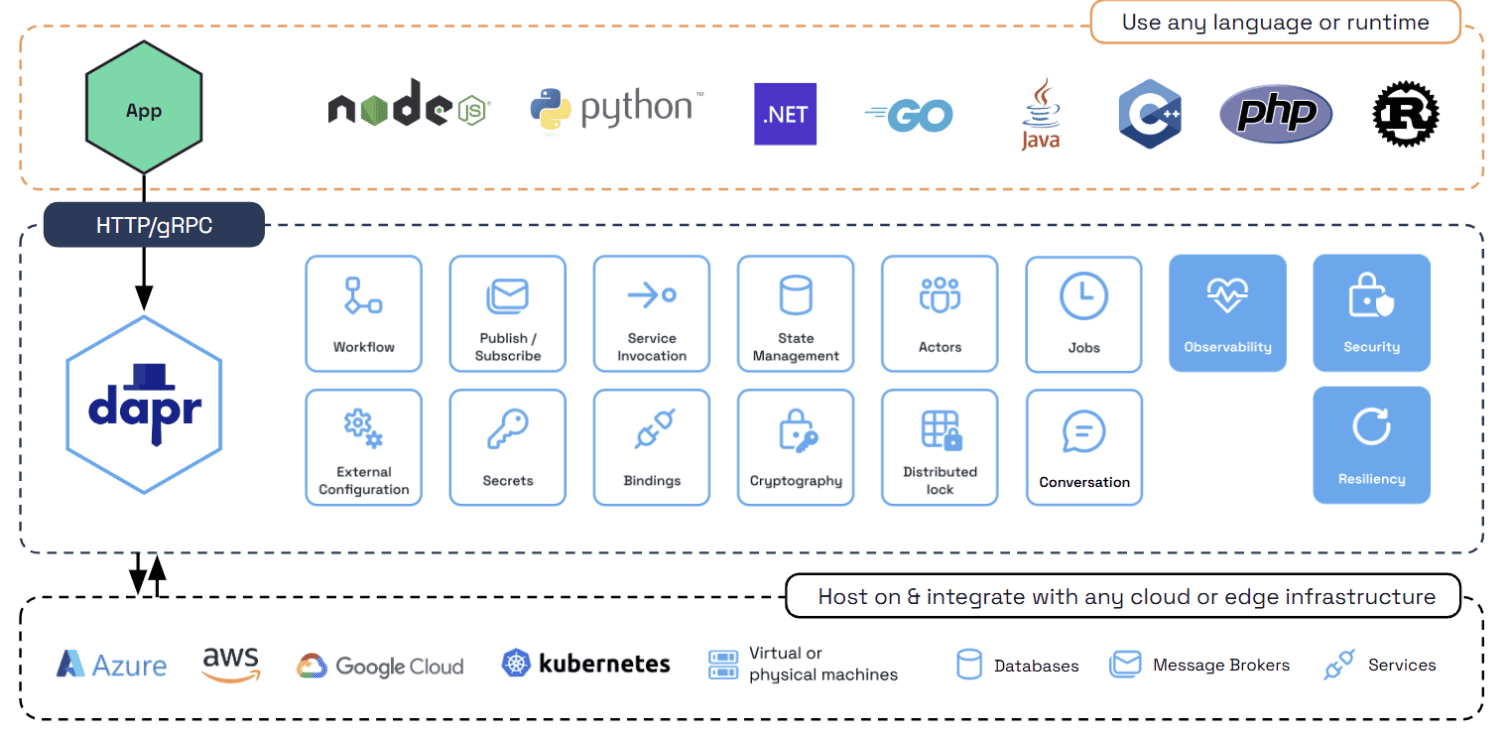
Source: https://docs.dapr.io/concepts/overview/
As part of this tutorial, we will cover how to use the Dapr conversation building block for interacting with different Large Language Models (LLM) providers.
LLM providers such as Anthropic, Google, OpenAI, and Ollama expose APIs that differ in both interface design and behavioral contracts. And supporting multiple providers often forces applications to embed provider-specific logic directly into the codebase. But, what if application developers only had to focus on prompts and tool calls, while the runtime handled provider-specific implementations, API interactions, and retry behavior? This kind of abstraction would not only simplify development but also make it easier to adopt or switch between LLM providers over time.
By declaring the LLM as a component in Dapr, we can achieve this abstraction by letting the runtime handle intricacies of tool handling and LLM api calls to Dapr. For example, in order to declare the anthropic component, we specify the type as “conversation.anthropic” with model values and api key.
apiVersion: dapr.io/v1alpha1
kind: Component
metadata:
  name: anthropic
spec:
  type: conversation.anthropic
  metadata:
  - name: key
    value: "anthropic-key"
  - name: model
    value: claude-opus-4.5
  - name: cacheTTL
    value: 1m
In the Dapr ecosystem, functionalities are delivered as components. So, if you were to use for example, the secrets functionality (another popular feature), declare the secrets component in a yaml config and Dapr will pick it up. More about the component concept can be found here.
Now, coming back to the LLM component, similar to Anthropic, if we want to talk to OpenAI, we will use the “conversation.openai” spec type and declare its corresponding fields.
apiVersion: dapr.io/v1alpha1
kind: Component
metadata:
  name: openai
spec:
  type: conversation.openai
  metadata:
  - name: key
    value: mykey
  - name: model
    value: gpt-4-turbo
  - name: endpoint
    value: 'https://api.openai.com/v1'
  - name: cacheTTL
    value: 10m
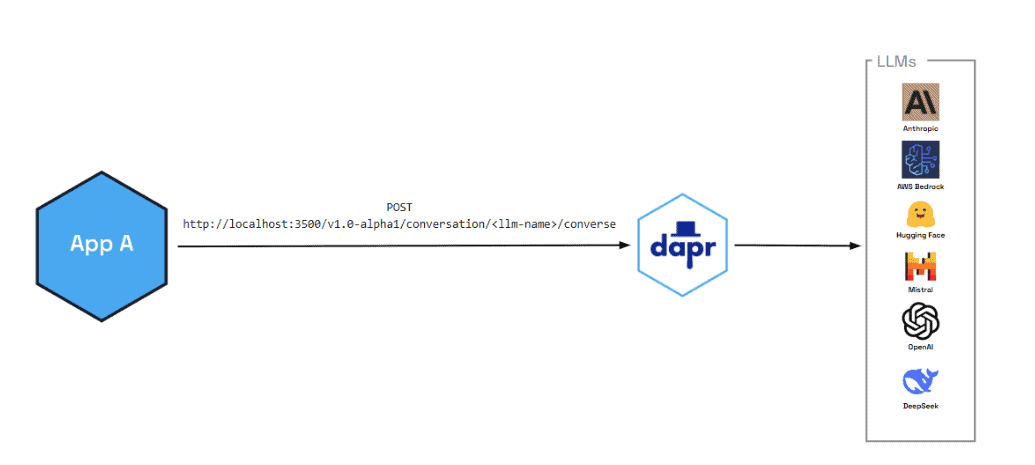
source: https://docs.dapr.io/developing-applications/building-blocks/conversation/conversation-overview/
It’s time to see the conversation functionality in action. Install the dapr cli, Docker Desktop and then run
dapr initNext, clone the Dapr java-sdk repository which also contains conversation component examples.
Run maven clean install to download all the packages and create jars.
mvn clean install -DskipTests
Then, use the “dapr run” to start the dapr runtime. The resources-path here specifies the folder where all Dapr components files are declared.
dapr run --resources-path ./components/conversation --app-id myapp --app-port 8080 --dapr-http-port 3500 --dapr-grpc-port 51439 --log-level debug -- java -jar target/dapr-java-sdk-examples-exec.jar io.dapr.examples.conversation.AssistantMessageDemo Below are the contents of the “AssistantMessageDemo” java file:
ToolMessage – Contains the result returned from an external tool or function that was invoked by the assistant.
SystemMessage – Defines the AI assistant’s role, personality, and behavioral instructions.
UserMessage – Represents input from the human user in the conversation.
AssistantMessage – The AI’s response, which can contain both text content and tool/function calls.
Finally, we use the DaprClient to make a call to the Dapr runtime locally printing out the response.
public class AssistantMessageDemo {

  public static void main(String[] args) {
    try (var client = new DaprClientBuilder().buildPreviewClient()) {

      var messages = List.of(
          new SystemMessage(List.of(
              new ConversationMessageContent(
                  "You are a helpful assistant for weather queries."
              ))),

          new UserMessage(List.of(
              new ConversationMessageContent("What's the weather in San Francisco?")
          )),

          new AssistantMessage(
              List.of(new ConversationMessageContent(
                  "Checking the weather."
              )),
              List.of(new ConversationToolCalls(
                  new ConversationToolCallsOfFunction(
                      "get_weather",
                      "{\"location\":\"San Francisco\",\"unit\":\"fahrenheit\"}"
                  )
              ))
          ),

          new ToolMessage(List.of(
              new ConversationMessageContent(
                  "{\"temperature\":\"72F\",\"condition\":\"sunny\"}"
              )
          )),

          new UserMessage(List.of(
              new ConversationMessageContent(
                  "Should I wear a jacket?"
              )
          ))
      );

      var request = new ConversationRequestAlpha2(
          "echo",
          List.of(new ConversationInputAlpha2(messages))
      );

      System.out.println(
          client.converseAlpha2(request)
                .block()
                .getOutputs().get(0)
                .getChoices().get(0)
                .getMessage().getContent()
      );
    }
  }
}
The above code example shows how Dapr’s conversation building block makes it easier to work with Large Language Models—without tying your code to any one provider.
Instead of embedding provider-specific SDKs and handling API quirks yourself, you declare your LLMs as Dapr components. The runtime takes care of the integration details: retries, authentication, and all the little differences between providers.