

The problem nobody talks about
GPUs are expensive; and yours are probably sitting idle right now. High-end GPUs (for example, NVIDIA A100-class devices) can cost $10,000+, and in a Kubernetes cluster running AI workloads, you might have dozens of them. Here’s the uncomfortable truth: most of the time, they’re sitting idle. If you’re struggling with GPU scheduling in Kubernetes or looking for ways to reclaim idle GPUs, you’re not alone.
A data scientist spins up a training job, requests 4 GPUs, runs for two hours, then leaves for lunch. The GPUs sit allocated but unused. Meanwhile, another team’s job is queued, waiting for resources that technically exist but aren’t available.
Standard Kubernetes scheduling doesn’t help here. It sees allocated resources as unavailable — period. The scheduler does not currently take real-time GPU utilization into account.
Kubernetes scheduling trade-offs for GPUs
Kubernetes was built for CPUs. Its scheduling model assumes resources are either allocated or free, with nothing in between. For CPUs, this mostly works — a pod using 10% of its requested CPU isn’t blocking others in the same way.
GPUs are different. They’re discrete, expensive, and often requested in large quantities. A pod requesting 4 GPUs gets exactly 4 GPUs, even if it’s only actively using them 20% of the time. This is the core challenge of GPU resource management in Kubernetes — the scheduler has no concept of actual utilization.
The default Kubernetes preemption mechanism (DefaultPreemption) can evict lower-priority pods to make room for higher-priority ones. But it only considers priority — not actual utilization. Pods are treated equivalently from a preemption perspective when they share the same priority, regardless of their current utilization.
We evaluated several existing approaches. For example, device plugins focus on allocation, while autoscaling addresses capacity rather than reclaiming idle resources. Cluster autoscaler can add nodes but won’t reclaim idle resources on existing ones. Various GPU sharing approaches exist, but they don’t address the fundamental scheduling problem.
The core idea: Utilization-aware preemption
We needed utilization-aware preemption that considers what GPUs are actually doing, not just what they’ve been allocated. The solution: a custom Kubernetes scheduler plugin for idle GPU reclaim that replaces the default preemption logic with an alternative approach that incorporates utilization signals.
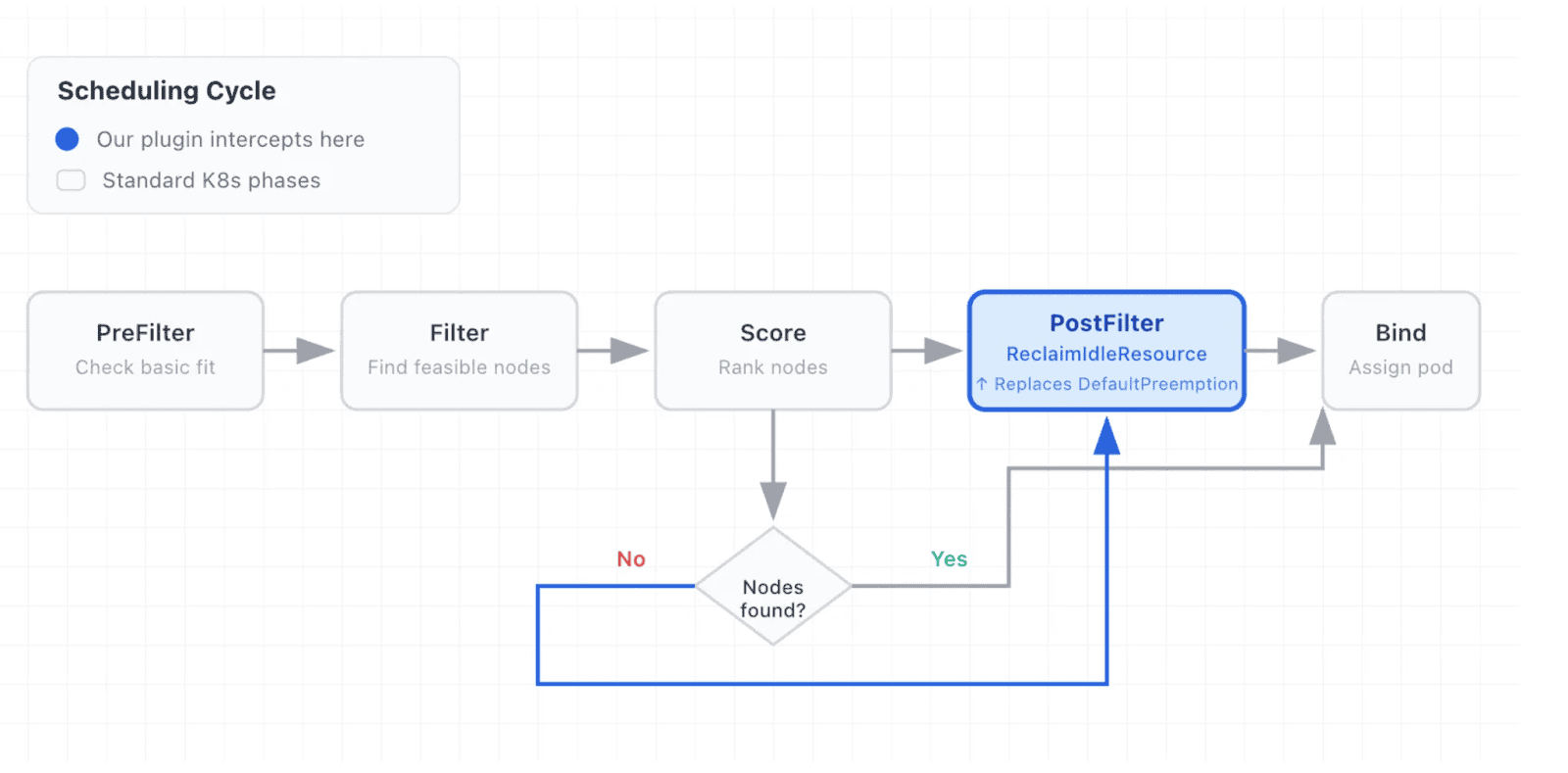
The plugin, which we called ReclaimIdleResource, operates in the PostFilter phase of the scheduling cycle. This is where Kubernetes looks for preemption candidates when a pod can’t be scheduled normally.
Here’s the key insight: instead of just comparing priorities, we query Prometheus for GPU utilization metrics (in our case, sourced from DCGM). A pod is only eligible for preemption if:
1. Its priority is below the preemptor’s threshold
2. It’s been running long enough to establish a usage pattern
3. Its actual GPU utilization is below a configured threshold
This means an idle pod with priority 1000 can be preempted by a pod with priority 500, if the idle pod isn’t actually using its GPUs.
Where ReclaimIdleResource fits in the scheduling cycle
The plugin replaces DefaultPreemption in the PostFilter phase, activating only when normal scheduling fails.
How it works
The plugin hooks into the scheduler as a PostFilter extension:
profiles:
- schedulerName: default-scheduler
  plugins:
    postFilter:
      enabled:
      - name: ReclaimIdleResource
      disabled:
      - name: DefaultPreemption
When a GPU-requesting pod can’t be scheduled, the plugin:
1. Checks cooldown — Has this pod recently triggered preemption? If so, wait. This prevents thrashing.
2. Scans potential victims — Finds all lower-priority pods on candidate nodes that have GPUs.
3. Evaluates each victim — Parses its PriorityClass for reclaim policy annotations, checks if it’s still in its “toleration period” (grace period after scheduling), queries Prometheus for average GPU utilization over the monitoring window, and compares utilization against the idle threshold.
4. Selects minimal victims — Sorts eligible victims by GPU count (descending) and priority (ascending), then selects the minimum set needed to free enough GPUs.
5. Validates the decision — Runs filter plugins to confirm the preemptor will actually fit after preemption.
The policy is defined per-PriorityClass through annotations:
kind: PriorityClass
metadata:
  name: batch-workload
  annotations:
    reclaim-idle-resource.scheduling.x-k8s.io/minimum-preemptable-priority: "10000"
    reclaim-idle-resource.scheduling.x-k8s.io/toleration-seconds: "3600"
    reclaim-idle-resource.scheduling.x-k8s.io/resource-idle-seconds: "3600"
    reclaim-idle-resource.scheduling.x-k8s.io/resource-idle-usage-threshold: "10.0"
value: 8000
This says: pods in this priority class can tolerate preemption for one hour after scheduling, and can be preempted if their GPU usage stays below 10% for an hour — but only by pods with priority 10000 or higher.
Key design decisions
Why PriorityClass annotations?
We considered a custom CRD, but PriorityClass already exists in the scheduling mental model. Teams already think about priority when designing workloads. Adding reclaim policy as annotations keeps the configuration close to where people expect it.
Why a monitoring window instead of instant utilization?
GPU workloads are bursty. A training job might spike to 100% utilization during forward/backward passes, then drop to near-zero during data loading. Instant measurements would give false positives. We use a configurable window (typically 30–60 minutes) to capture the true usage pattern.
Why query Prometheus instead of using in-memory metrics?
The scheduler runs as a single replica. We needed utilization data that survives scheduler restarts and can be queried historically. DCGM exports to Prometheus naturally, and most GPU clusters already have this pipeline.
Why a cooldown period?
Without it, a preemptor pod could trigger preemption, fail to schedule for unrelated reasons, and immediately trigger another preemption attempt. The 30-second cooldown prevents rapid-fire preemption storms.
What we learned
Tuning matters more than we expected. The idle threshold and monitoring window need to match your workload patterns. Too aggressive and you’ll preempt jobs mid-training. Too conservative and you won’t reclaim much.
Observability is essential. We added extensive logging and Kubernetes events so operators can understand why preemption decisions were made. When someone’s job gets preempted, they want to know why.
Multi-Instance GPU (MIG) adds additional scheduling considerations.. NVIDIA’s Multi-Instance GPU feature means a single physical GPU can be partitioned. We had to add partition-size compatibility checks to avoid preempting pods on nodes where the preemptor couldn’t run.
Related Links
• Kubernetes Scheduler Plugins: https://github.com/kubernetes-sigs/scheduler-plugins
• NVIDIA DCGM Exporter: https://github.com/NVIDIA/dcgm-exporter
Originally published on Medium. Permission granted for republishing on CNCF blog.